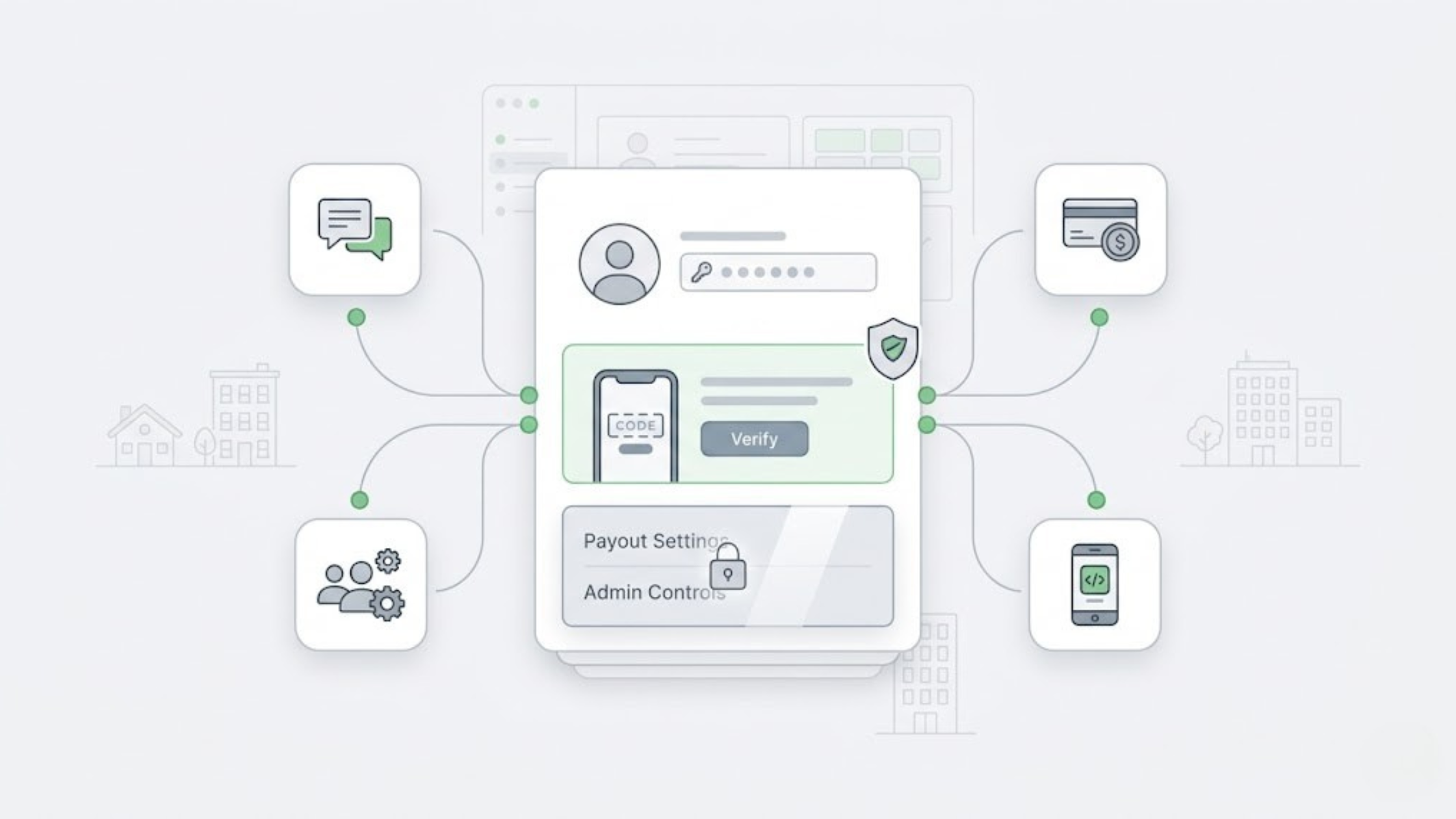
Multi-factor authentication matters because one stolen password can expose guest data, admin settings, and payout controls faster than most teams realize. In rental operations, the risk is not just account access. The risk is what that account can change once it is open.
That matters more in property management because the same login often sits close to channel access, guest communication, payment setup, and team permissions. A phished admin password during a busy turnover day is not just a login problem. It can become a payout problem, a guest-message problem, or a permissions problem before anyone notices.
If your team is still protecting high-risk actions with passwords alone, this is the place to tighten first.
Multi-factor authentication is a login process that asks for a second proof beyond a password, such as a code from a phone or authenticator app. It lowers account-takeover risk because a leaked password alone is not enough to reach sensitive settings, admin controls, or payout-related actions.
Why multi-factor authentication matters more in rental operations
Vacation rental teams do not work in a clean, single-login environment. They jump between guest questions, listing updates, payment issues, owner requests, turnover coordination, and staff handoffs, often while several people touch the same operational stack in one day.
That is why weak login protection creates bigger downstream problems here than it does in a simpler business. If one account can open message history, user permissions, and money-related settings, the real issue is not “someone guessed a password.” The issue is that one bad login can trigger a mess across multiple parts of the business.
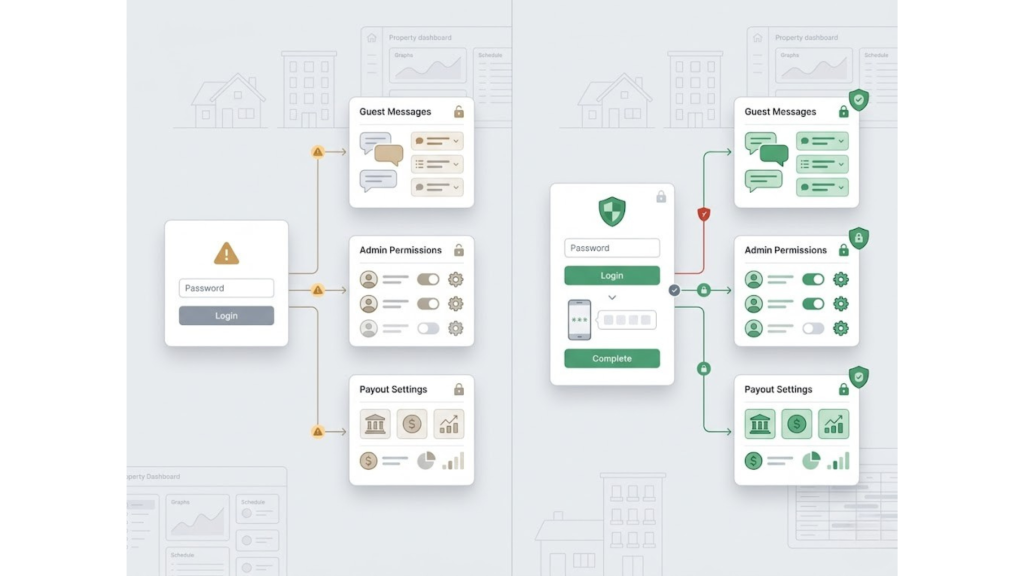
Before and after multi factor authentication: a password-only login can expose guest messages, admin permissions, and payout settings, while a second verification step adds control before high-risk actions open.
If your workflow already feels fragmented, this breakdown of what a booking channel manager does helps explain why access control and system structure are tied together.
Before
Password-only access protects the same account that can open guest details, change user access, or touch payout-related settings.
After
A second identity check sits between the password and the action, so a stolen credential does not automatically become a guest-data issue or a payout issue.
What real multifactor authentication looks like in daily ops
Not every extra login step is real multi-factor authentication. The point is not to add friction for the sake of it. The point is to require a second factor from a different category, which is why a password plus a security question is weaker than a password plus an app-based code.
NIST defines MFA around distinct factors such as something you know, something you have, and something you are. NIST’s MFA guidance is useful here because it makes the difference between “extra steps” and real factor diversity clear.
That distinction matters in the real world because many account-takeover paths reuse the same weakness. If an attacker can phish one browser session, two knowledge-based checks can fall together. A possession-based factor changes that because the second barrier does not live in the same place as the password.
Most teams will choose between email, SMS, WhatsApp, and authenticator app codes. All four are better than password-only access, but they do not carry the same tradeoffs once you look at real failure points.
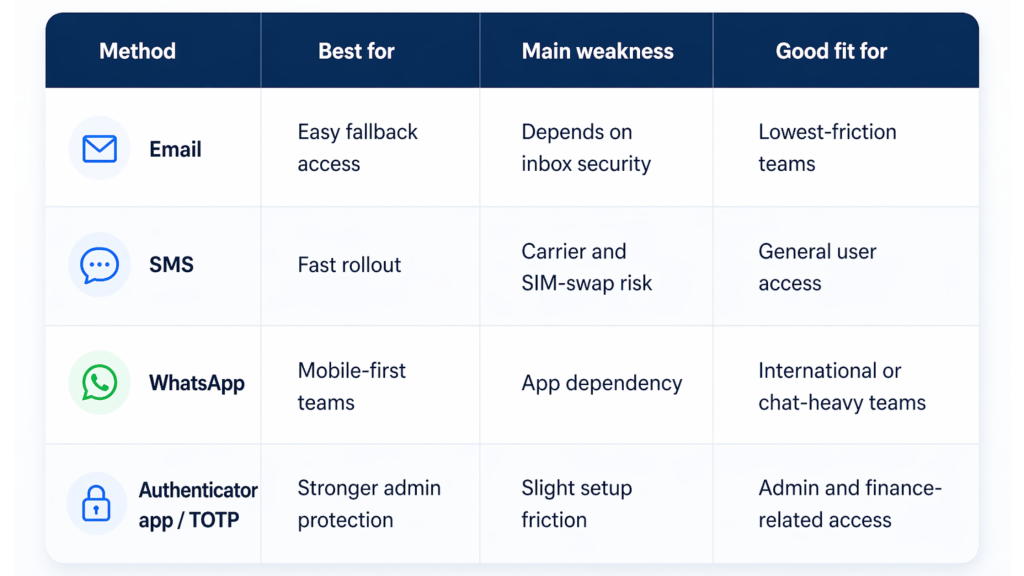
CISA recommends stronger, phishing-resistant MFA where possible, which is why app-based methods are usually the better default for higher-risk accounts and admin actions. CISA’s MFA guidance is especially helpful because it frames MFA as a business control, not just a technical setting.
The best choice is not the method that sounds strongest in theory. It is the method your team will actually use consistently on the accounts that matter most.
How to roll out multi-factor authentication without slowing the team
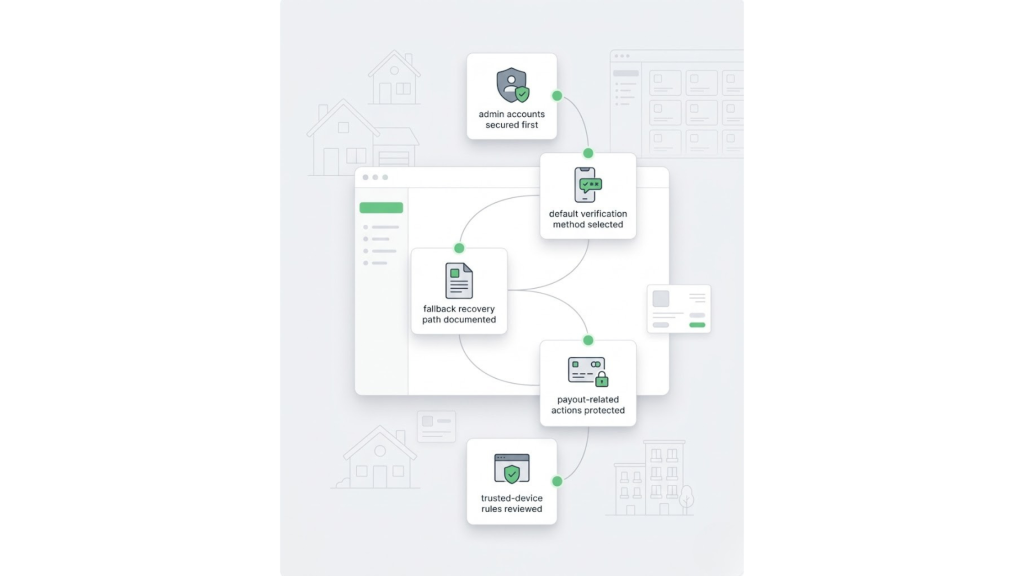
A practical multi factor authentication rollout starts with admin accounts, then standardizes verification, recovery, payout protection, and trusted-device rules.
- Start with admin accounts first.
These accounts usually sit closest to payment setup, user permissions, and system-wide controls, so they should not rely on a password alone. - Choose one default method for high-risk users.
If every admin uses a different method, support gets messy fast. A cleaner standard reduces confusion during resets, onboarding, and handoffs. - Document your fallback path.
Decide what happens when a user loses a phone, changes a number, or cannot receive a code. Most teams do not fail at setup. They fail at recovery. - Separate payout risk from routine login risk.
Reading a message is not the same as changing financial settings. The second one deserves stricter control. - Review remembered-device rules.
Trusted-device shortcuts reduce daily friction, but only if the team understands when they expire and what resets them.
What usually breaks the shortcut?
A different browser, a private window, a new device, or a long gap between logins can all reset a remembered-device experience. That is why rollout guidance should cover not just how to enable MFA but also what users should expect when the shortcut stops working.
This is the same logic behind other avoidable operational misses. One weak control upstream can turn into a bigger problem downstream, which is why posts like Prevent Double Bookings: 3 Methods That Work resonate with hosts and PMs in the first place.
See how AdvanceCM’s channel manager supports tighter access control in day-to-day operations.
Where multi-factor authentication becomes operational control
This is where multifactor authentication becomes practical instead of theoretical. AdvanceCM is Tokeet’s latest channel manager, and it supports email, SMS, WhatsApp, and TOTP-based setup so teams can choose a method that fits daily usage while still moving higher-risk accounts toward stronger protection.
The more important part is where the control sits. In AdvanceCM, admins can enforce MFA at the account level, and admins must enable MFA before they can add payment gateways. That means a leaked password alone cannot be used to move straight into one of the highest-risk financial actions in the system.
That is the real operational value. The identity check is attached to the step that can hurt you, not buried in a generic security menu that no one thinks about until something goes wrong.
You don’t need new tools to start—just fix the edge cases first.
The same pattern shows up in payment policy decisions too. If your operation already has weak controls around when money is secured, this piece on pay on arrival vs prepayment for rental hosts is a good companion read because it shows how small setup choices create larger revenue exposure.
Conclusion
Multi-factor authentication is not valuable because it adds one more login step. It is valuable because it breaks the path between a stolen password and a high-risk action. In a rental business, that can mean the difference between a failed login attempt and a payout problem, a guest-data problem, or an admin-access problem.
The strongest setup is usually the simplest one to explain: protect admin accounts first, use a real second factor, document the fallback path, and attach stronger checks to the actions that move money or change account control. That is how multi-factor authentication stops being a security theory and starts protecting the business during normal, messy, real-world operations.
Educate the team first, then lock the actions that can cost you money.
FAQs
- What is multi-factor authentication?
Multi-factor authentication is a login method that asks for more than a password before granting access. That second proof can be a code, a device-based prompt, or a biometric factor. - Is email good enough for multi-factor authentication?
Email is better than password-only access, but it is only as strong as the inbox receiving the code. For higher-risk accounts, app-based methods usually create a tighter path. - Why should admins use multi-factor authentication first?
Admins usually control broader account settings, user permissions, and payment-related actions. That makes admin access the highest-value target to lock down first. - Does multi-factor authentication slow teams down too much?
It can feel like extra friction at first, but most of the drag comes from poor rollout, not the control itself. A clear default method and a documented fallback process remove most of that pain. - Can multi-factor authentication reduce payout risk?
Yes, because it blocks a stolen password from becoming immediate access to high-risk settings. That matters most when payment tools, admin controls, and guest records are close to the same login.

Welcome to Tokeet’s Podcast — your trusted source for insights, trends, and strategies shaping the vacation rental industry. Each episode features expert interviews, data-driven analysis, and practical tips to help property managers grow their businesses, improve guest experiences, and stay ahead in a rapidly evolving market. Whether you’re new to short-term rentals or managing a large portfolio, tune in to stay informed and inspired.
Episode Description:
Static pricing can make a full calendar look healthier than it really is.
In this episode, we break down how vacation rental managers can use demand, booking pace, market context, and owner goals to make clearer rate decisions.
We also cover why dynamic pricing is not about raising rates every night.
It is about knowing when a date needs protection, when a gap needs movement, and when the rate should stay where it is.
You will also hear how pricing decisions affect owner conversations, team workload, and listing performance.
Based on the full blog breakdown on dynamic pricing for vacation rentals.
Key Takeaways:
✅ Fast bookings can still signal underpricing
✅ Slow gaps may need rate, stay-rule, or listing review
✅ Dynamic pricing works best with human oversight
✅Owner trust improves when rate logic is clear
✅ Pricing should be reviewed with full booking context
Related Links:Company: https://www.tokeet.com/Blogs: https://www.tokeet.com/blog/Blog: Dynamic Pricing for Vacation Rentals: Stop Rate Mistakes 👉https://blog.tokeet.com/dynamic-pricing-for-vacation-rentals/
This is a public episode. If you would like to discuss this with other subscribers or get access to bonus episodes, visit podcast.tokeet.com