
Key Takeaways
- With Booking.com Request to Book, guests send a request first, and you decide whether they can book.
- Booking.com offers it only for properties new to Booking.com that rent out an entire holiday home, apartment, or villa.
- You have 24 hours to respond. An approved guest then has 24 hours to complete the booking.
- In AdvanceCM, requests arrive as inquiries with Approve and Decline buttons, and they don’t block your calendar.
- Check availability across your channels before you approve.
Booking.com Request to Book lets you approve or decline a booking request before the guest can reserve your property. AdvanceCM now supports it. Requests arrive in AdvanceCM as inquiries, where you review the dates, the total, and what Booking.com shares about the guest, then approve or decline.
This guide covers who can use it, how requests reach AdvanceCM, the time limits Booking.com sets, and what to check before you approve. AdvanceCM’s help article on the Request to Book feature walks through the full workflow.
Booking.com Request to Book adds an approval step before a guest can reserve. A guest sends a request, you have 24 hours to approve or decline, and an approved guest has 24 hours to complete the booking. In AdvanceCM, requests come in as inquiries that don’t block your calendar. It’s available for new Booking.com properties that rent out an entire holiday home, apartment, or villa.
What Booking.com Request to Book Changes
With instant booking, a guest who finds open dates can reserve straight away. Booking.com Request to Book puts a step in between. The guest sends a request, and the reservation only goes ahead if you approve it.
Booking.com’s partner guide to Request to Book says the feature was built because vacation rental partners asked to review requests before accepting them. Booking.com’s own example is a property that isn’t very accessible, where the host wants to flag that before the stay is confirmed. The same guide notes you can chat with guests before approving through Booking.com’s pre-booking messaging.
It isn’t the right choice for every host. Instant booking is quicker for travelers who want a confirmed stay right away, and Booking.com presents the two models as options, not as one better than the other.
Who Can Use Booking.com Request to Book
Eligibility is the first thing to check. Booking.com’s Request to Book eligibility criteria set these conditions:
- New to Booking.com. The property must be newly listed on Booking.com. Existing properties can’t be switched from Instant Booking to Request to Book.
- Entire-place property types. The property must be a holiday home, apartment, or villa rented out as a whole.
- A connectivity provider that supports it. If you manage the listing through a channel manager, it has to support Request to Book on its side. AdvanceCM now does.
Booking.com says the model is available worldwide. In practice, that makes Booking.com Request to Book a decision you make when you add a property, not a switch for listings that already take instant bookings.
That timing fits naturally into your launch checklist. Our guide on how to connect new properties to Booking.com faster covers preparing the property record, rates, and policies before setup, which is also the moment to choose a booking model.
How Booking.com Request to Book Works in AdvanceCM
The workflow has five steps:
- Turn it on in Booking.com. Request to Book is a Booking.com setting, so you enable it in your Booking.com account. It can’t be switched on from AdvanceCM.
- A guest sends a request. Once the setting is on, eligible guests submit a request instead of booking instantly.
- AdvanceCM imports it as an inquiry. The inquiry shows the requested arrival and departure dates and the total booking amount. It also shows what Booking.com shares about the guest’s history, such as verified email and phone, completed stays, previous no-shows, and whether they have stayed with you before.
- You approve or decline. The inquiry has Approve and Decline buttons, along with a “Respond by” time.
- The request is resolved. If you approve, Booking.com is notified and the guest can complete the booking. If you decline, the request leaves your active inquiry list, shows as a Declined booking, and the guest can’t continue with it.
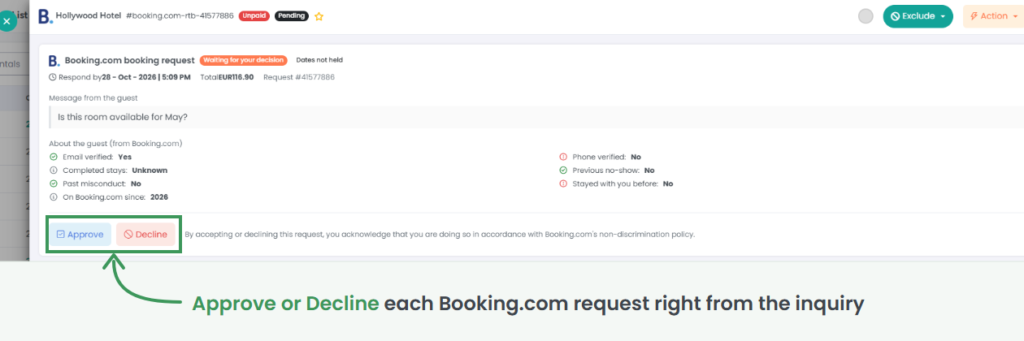
Guest details are not included in the imported inquiry. You see the request and the guest’s Booking.com history, not a full guest record.
Requests travel through the same Booking.com connection as your confirmed reservations, so they sit alongside the rest of your bookings in the AdvanceCM Channel Manager.
The Time Limits That Apply
Booking.com Request to Book runs on fixed windows, according to Booking.com’s documentation:
- Three days’ notice. Guests must send a request at least three days before check-in. Request to Book properties don’t appear in Booking.com searches for check-in dates less than three days away, so last-minute travelers can only book instant-booking properties.
- 24 hours to respond. You have 24 hours to approve or decline. If you don’t respond in time, the request expires.
- 24 hours to complete. After you approve, the guest has 24 hours to finish the booking. If they don’t, the request expires and no reservation is made.
- The price can change. Booking.com doesn’t hold availability for these requests, so the price may move between the request and the completed booking. Booking.com notifies the guest, who decides whether to continue.
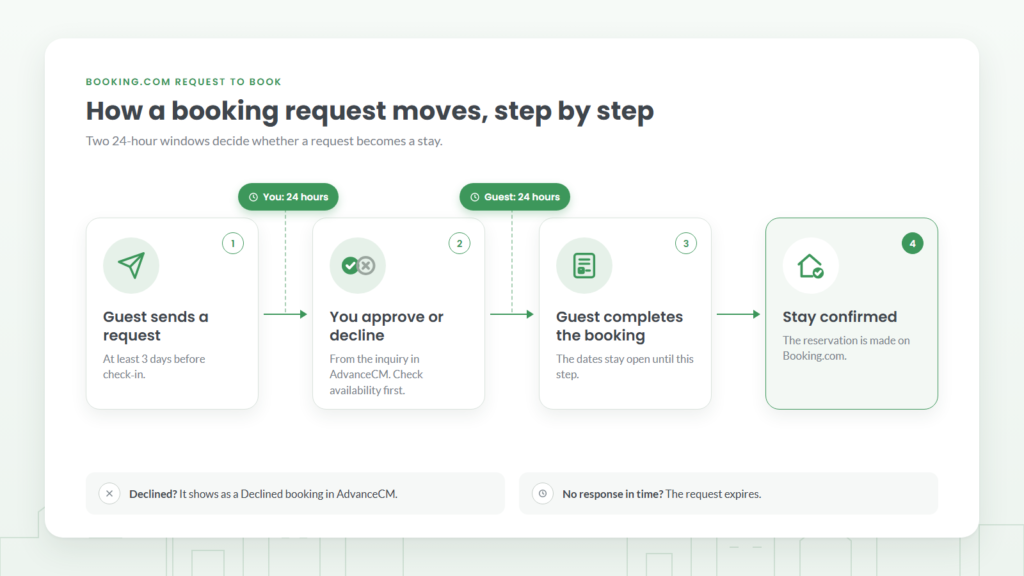
The 24-hour response window is the one to plan around. Decide who on your team checks new Booking.com inquiries and how often, so requests don’t expire unanswered.
Check Availability Before You Approve
A Booking.com Request to Book inquiry doesn’t block dates on the AdvanceCM calendar. No reservation or calendar block is created when it’s imported, and the requested dates stay open until you approve and the guest completes the booking. AdvanceCM’s documentation advises reviewing availability before you approve.
That matters most if the property is listed on more than one channel. While a request is pending, the same dates can still be booked elsewhere. Our post on how to prevent double bookings explains how gaps in calendar sync between channels lead to overlapping stays.
Booking.com Request to Book in Practice: A Long-Weekend Example
Say a guest sends a request for a Friday-to-Sunday stay three weeks away. Here’s how it plays out in AdvanceCM:
- The request arrives. It appears as an inquiry marked as waiting for your decision, with a “Respond by” time. The weekend isn’t held on your calendar.
- You review it. You read the guest’s message and the history Booking.com shares, such as completed stays and whether they have stayed with you before.
- You check the calendar. The weekend is still free on your other channels, so you select Approve.
- The guest finishes booking. Booking.com is notified, and the guest has 24 hours to complete the booking. Once they do, the reservation is made. If they don’t, the request expires and the weekend stays open.
If the weekend had been booked on another channel while the request was waiting, you would decline it instead. The request then shows as a Declined booking in AdvanceCM, and the guest can’t continue with it.
Deciding Whether to Approve or Decline
The inquiry gives you the facts Booking.com shares: dates, total, the guest’s message, and their history on the platform. Read them against what the property needs, such as the length of stay, the time of year, and anything guests should know before arriving.
Booking.com asks partners to review its non-discrimination guidelines before declining a request, and the AdvanceCM inquiry shows a reminder of that policy next to the Approve and Decline buttons. Base each decision on the stay and the property, applied the same way to every guest.
A consistent process helps here. Our guide to vacation rental guest screening covers the questions hosts use before approving a stay, such as who is traveling and whether the guest has read the house rules.
Next Step
If you’re adding a new holiday home, apartment, or villa to Booking.com, decide during setup whether it should take instant bookings or use Booking.com Request to Book. Then name the person who will answer requests within 24 hours. To see how AdvanceCM keeps Booking.com bookings and availability in one place with your other channels, visit the AdvanceCM Channel Manager page.
FAQs
- Can I switch an existing Booking.com listing to Request to Book? No. Booking.com Request to Book is only offered for properties that are new to Booking.com. Existing properties can’t be converted from Instant Booking.
- Does a Booking.com booking request block dates in AdvanceCM? No. The request comes in as an inquiry, and the dates stay available until you approve and the guest completes the booking.
- What happens if I don’t respond within 24 hours? The request expires, according to Booking.com. The guest would need to send a new request.
- Does approving a request confirm the reservation? Not on its own. Approving lets the guest complete the booking, and the reservation is made only once they do.
- Where can I read AdvanceCM’s announcement? AdvanceCM announced Booking.com Request to Book support in its changelog.

Welcome to Tokeet’s Podcast — your trusted source for insights, trends, and strategies shaping the vacation rental industry. Each episode features expert interviews, data-driven analysis, and practical tips to help property managers grow their businesses, improve guest experiences, and stay ahead in a rapidly evolving market. Whether you’re new to short-term rentals or managing a large portfolio, tune in to stay informed and inspired.
With instant booking, any guest who finds open dates can reserve straight away. Booking.com Request to Book adds a step in between: the guest sends a request, and you decide whether they can book.
This episode explains who can use it, since Booking.com offers it only for properties new to Booking.com that rent out an entire holiday home, apartment, or villa. You’ll hear how each request arrives in AdvanceCM as an inquiry, with the dates, the total, and the guest’s Booking.com history, ready for you to approve or decline.
We also cover the time limits: you have 24 hours to respond, and an approved guest has 24 hours to complete the booking. Finally, we explain why you should check your calendar before approving, because a request doesn’t hold your dates.
Key Takeaways:
✅ Only properties new to Booking.com can use Request to Book
✅ Requests arrive in AdvanceCM as inquiries with Approve and Decline button
✅ You have 24 hours to respond, and the guest has 24 hours to book
✅ Approving doesn’t confirm the stay; the guest still completes the booking
✅ Requests don’t hold dates, so check availability first
Related Links:
Company: https://www.tokeet.com/Blogs: https://www.tokeet.com/blog/Blog: Booking.com Request to Book: How to Review Guests Before They Book 👉https://blog.tokeet.com/booking-com-request-to-book/
This is a public episode. If you would like to discuss this with other subscribers or get access to bonus episodes, visit podcast.tokeet.com