
Key Takeaways
- Tokeet users can automate security deposits by connecting Guestflow, a long-standing Tokeet integration partner.
- Tokeet syncs each booking to Guestflow and sends deposit messages for OTA bookings. Guestflow runs the deposit rules, the guest app, and release and capture.
- In Cotswold Serviced Homes’ setup, stays of six nights or fewer get a card hold at 6 am on arrival day, and longer stays get a paid deposit refunded after checkout.
- Door codes stay locked until the deposit and the other check-in steps are done.
- Cotswold reports its weekly deposit admin fell from 3 to 4 hours to under 30 minutes.
Collecting a security deposit sounds simple until you count the steps. Someone sends a card link, matches the payment to the booking, places a hold on arrival day, calls the guest when a card is declined, and goes back after checkout to release it. Repeat that for every booking, and it adds up to hours of admin each week.
If you run your rentals on Tokeet, you can automate security deposits by connecting Guestflow, our long-standing integration partner. Tokeet receives the booking, and Guestflow turns it into a deposit workflow: it picks the right deposit method, asks the guest at the right time, places the hold, follows up on failed cards, and keeps door codes locked until the deposit is in place.
Short Answer: To automate security deposits in Tokeet, connect Guestflow. Bookings sync from Tokeet into Guestflow, where rules choose a card hold or a paid deposit based on the length of stay. The guest completes the deposit step in Guestflow’s guest app, the hold is placed on arrival day, and you release or capture it after checkout.
Why Manual Deposits Take So Much Time
Cotswold Serviced Homes, a Tokeet customer with 12 homes across Cheltenham, Gloucester, Stroud and Stonehouse, described its old deposit routine as five steps with a person at every one:
- The guest registered a card through a payment link.
- Someone matched the payment to the booking.
- On arrival day, someone placed the hold by hand and called the guest if the card was declined.
- After departure, someone went back to release the hold or capture a charge.
- On longer stays, the hold could expire before the guest left.
That last step is easy to miss, because card holds don’t last for the whole stay. Stripe’s guide to placing a hold on a card lists authorization windows of up to seven days for most online card payments, so a hold placed on arrival day can lapse during a long stay.
For Cotswold, this routine meant 3 to 4 hours of deposit admin a week. That’s the time you get back when you automate security deposits.
How Tokeet and Guestflow Split the Work
When you automate security deposits this way, each tool has a clear job:
- Tokeet receives the booking from Airbnb, Booking.com or your direct channel and syncs it to Guestflow. Deposit messages for OTA bookings are sent to the guest through Tokeet.
- Guestflow applies your deposit rules, runs the guest journey in its guest app, and handles release, capture and refunds.
You keep managing listings, rates and reservations in Tokeet, and Guestflow works alongside it. Our announcement of the Guestflow integration covers Guestflow’s wider features, including its guest app and team tools.
How to Automate Security Deposits Step by Step
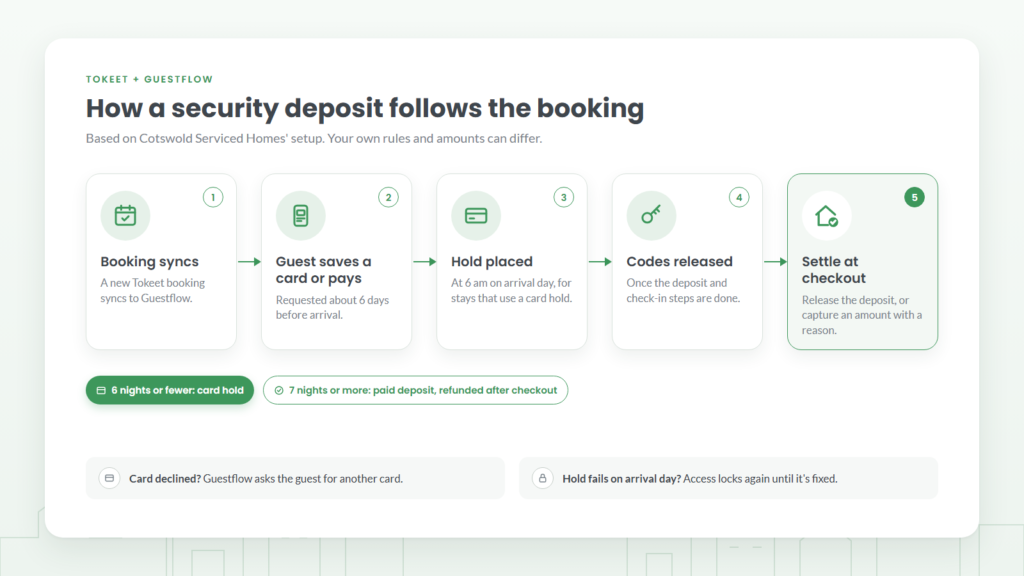
Here is the workflow Cotswold uses to automate security deposits. Your own rules and amounts can be different.
- The booking syncs, and a rule picks the method. A new Tokeet booking syncs to Guestflow. Stays of six nights or fewer get a card hold, and stays of seven nights or more get a fully paid deposit that’s refunded after checkout.
- The guest completes the deposit step. The first request usually goes out about six days before arrival. The guest follows the link to Guestflow’s guest app and saves a card or pays the deposit.
- The hold is placed on arrival day. If the card is saved in advance, Guestflow schedules the hold for 6 am on arrival day. If the guest adds the card later, the hold is placed straight away.
- Failed cards are followed up automatically. If a hold fails, Guestflow asks the guest for another card in the guest app.
- You make the call at checkout. Once your cleaning team confirms the property’s condition, you release the hold or capture an amount beside the booking, with a reason. For a paid deposit, Guestflow keeps the amount you capture and refunds the rest.
Each action is recorded with who took it and when, so your team has one place to check if a guest asks about a charge.
Keep Door Codes Locked Until the Deposit Is Done
Guestflow treats the deposit as part of guest access. While a deposit is outstanding, the guest app shows access as locked, and door codes aren’t released. Once the deposit and the other check-in steps are complete, codes are released at the time you set.
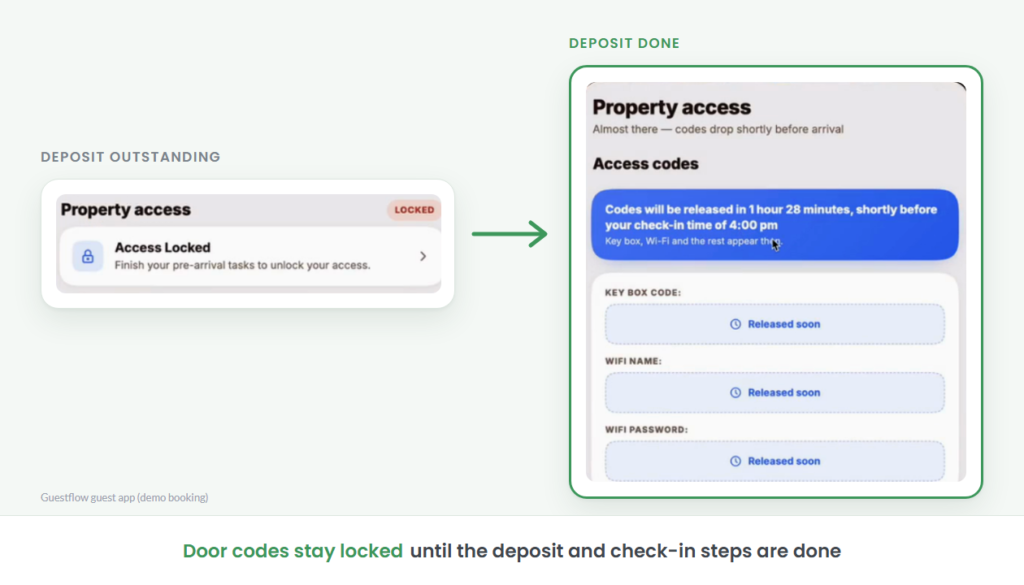
If a scheduled hold fails on arrival day, Guestflow locks access again and asks the guest to fix it. You can still remove the deposit requirement by hand for a guest you trust.
With this setup, nobody has to remember a final deposit check before sending codes. For more on automating guest access, read our post on smart access for short-term rentals.
Cotswold Serviced Homes: Before and After
Cotswold has used Guestflow alongside Tokeet for three years and started to automate security deposits in June 2026. These are the figures it reported:
| Deposits | Before | After |
|---|---|---|
| Admin per week | 3-4 hours | Under 30 minutes |
| Deposit handling | 5 manual steps | Automated, with release or capture at checkout |
| Stripe visits per booking | Up to 3 | None |
| Cover on longer stays | Lapsed after day 7 | Full stay |
Guestflow’s platform data for 26 June to 22 September 2026 shows 153 bookings covered and 14 of 16 failed cards resolved automatically. These are one operator’s results, not a forecast for your business.
Asked whether he’d recommend Guestflow, Lee Cookes, Cotswold’s founder and director, said: “Just the thought of doing them manually now…”
What to Decide Before You Automate Security Deposits
Before you automate security deposits, agree on a few policies with your team:
- Method by length of stay: the point where you switch from a hold to a paid deposit.
- Amounts: how much to hold for each property.
- Exceptions: who can waive a deposit, and when.
- Timing: when codes should be released on arrival day.
Writing these down first makes the rules easier to set up and easier for your team to follow. Our post on vacation rental compliance automation takes the same approach to registration and reporting steps that are easy to miss.
Next Step
If you run your rentals on Tokeet and still handle deposits by hand, see how Guestflow can automate security deposits for your account.
Book a Guestflow demo for Tokeet users.
FAQs
- Do I need to leave Tokeet to automate security deposits? No. Tokeet is your property management system. Guestflow connects to it and runs the deposit workflow.
- How do I automate security deposits on stays longer than a week? In Cotswold’s setup, stays of seven nights or more use a fully paid deposit instead of a hold, because most online card holds expire within about seven days.
- What if a guest’s card is declined? Guestflow asks the guest to add another card in the guest app. Cotswold reported 14 of 16 failed cards resolved without staff stepping in.
- Who decides whether to keep part of a deposit? You do. After checkout, you release the hold or capture an amount with a reason, and the decision is recorded.
- Can guests get their door codes before the deposit is done? Not by default. Codes stay locked until the deposit and the other check-in steps are complete, unless you remove the requirement for that guest.

Welcome to Tokeet’s Podcast — your trusted source for insights, trends, and strategies shaping the vacation rental industry. Each episode features expert interviews, data-driven analysis, and practical tips to help property managers grow their businesses, improve guest experiences, and stay ahead in a rapidly evolving market. Whether you’re new to short-term rentals or managing a large portfolio, tune in to stay informed and inspired.
Security deposits usually mean sending card links, matching payments, placing holds on arrival day, and coming back after checkout to release them.
This episode walks through how Tokeet and Guestflow split that work: Tokeet syncs the booking, and Guestflow runs the deposit from there. You’ll hear how a simple rule picks the method, with a card hold for stays of six nights or fewer and a paid deposit for longer stays, because card holds usually expire within about seven days.
We also cover how door codes stay locked in the guest app until the deposit and check-in steps are done. Cotswold Serviced Homes, a 12-home Tokeet customer, reports that weekly deposit admin went from three to four hours to under 30 minutes.
Finally, we go over what to decide before you switch, so the setup fits your own properties.
Key Takeaways:
✅ Tokeet syncs bookings to Guestflow, which runs the deposit steps
✅ Stays of six nights or fewer get a card hold; longer stays pay a deposit
✅ Door codes stay locked until the deposit is done
✅ You release or capture the deposit after checkout
✅ Cotswold Serviced Homes reports deposit admin fell to under 30 minutes a week
Related Links:
Company: https://www.tokeet.com/Blogs: https://www.tokeet.com/blog/Blog: How to Automate Security Deposits in Tokeet With Guestflow 👉https://blog.tokeet.com/automate-security-deposits/
This is a public episode. If you would like to discuss this with other subscribers or get access to bonus episodes, visit podcast.tokeet.com