
TL;DR
- TV3 isn’t missing features, you’re just not seeing them in the older layout.
- AdvanceCM is Tokeet’s modern vacation rental channel manager with Unified Inbox, Smart Devices, Autopilot rules, vendors/charges/extras, AI, and more already built in.
- You can upgrade in small, safe steps or watch the TV3 → AdvanceCM migration live on the webinar first.
If your vacation rental channel manager still lives inside TV3, it probably feels like it’s holding your business back. Messages sit in different places, tasks slip, and every “simple” change needs way more clicks than it should.
This guide shows you why the tools you think are missing already live in the new system and how to move without blowing up your week. AdvanceCM is the modern vacation rental channel manager built for hosts and property managers who started on TV3 but have clearly outgrown it. If you want extra context while you read, you can also scan our broader vacation rental operations blog.
See how the upgrade works →
Why Your Vacation Rental Channel Manager Feels Stuck on TV3
On TV3, your days can turn into a mess of tabs, inboxes, and manual checks. Your vacation rental channel manager never quite feels under control, and you end up reacting to problems instead of steering the business.
Owners often say their setup doesn’t have a unified inbox or can’t keep up with their growth, even though that capability already exists in the newer product. A lot of the pain comes from visibility, not from actual product limits.
Messages are spread across channels, staff use different habits, and ad hoc fixes make it look like the tool can’t handle the work. The TV3 to AdvanceCM migration is about moving to a “single-dashboard” style setup where your most important work happens in one place, instead of being scattered across tabs and tools.
Internal data shows that around 40–50% of users still operate on TV3, and many of the loudest “missing feature” complaints are about things that already live inside AdvanceCM, most famously, the Unified Inbox and AI-powered automation.
Mini story:
A 30-unit manager on TV3 thought they needed a completely new tool just to get a unified inbox and better automation. After switching on AdvanceCM, they kept the same channels, turned on Autopilot rules and Smart Devices, and cut their daily message-checking time almost in half without changing their team or pricing.
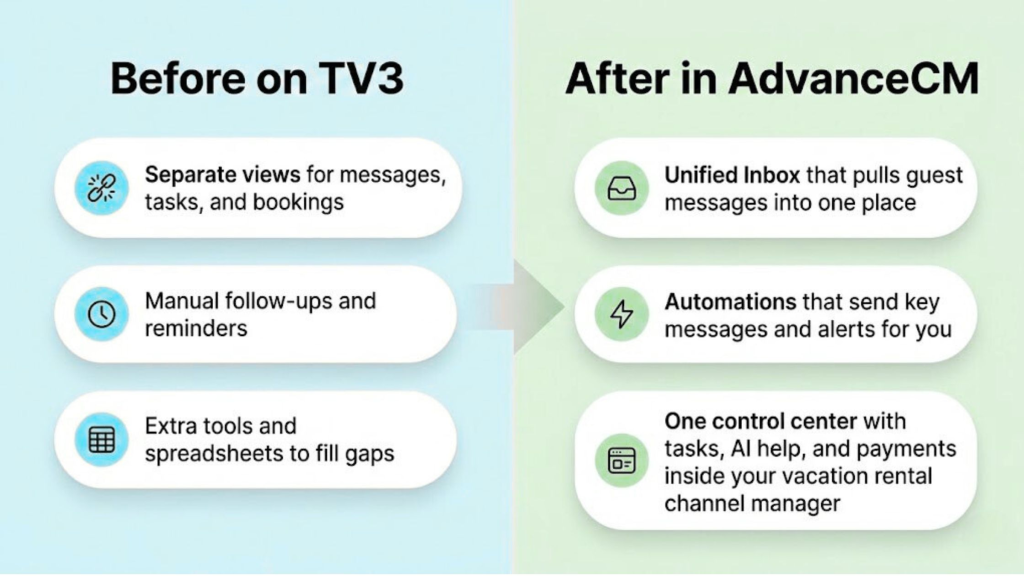
Before vs After: how TV3 workflows compare to AdvanceCM’s Unified Inbox, automation, and one control center.
Meet AdvanceCM: Your Modern Vacation Rental Channel Manager
AdvanceCM is the modern version of how your vacation rental channel manager was always meant to work. Same job and same purpose, but built to handle today’s pace and guest expectations instead of the limits of older layouts.
To keep things simple, think in three outcome-based groups instead of a long feature list.
Communicate & Coordinate is for the overwhelmed admin who needs clarity: the Unified Inbox pulls messages from your major channels into one place, Task Management keeps cleaners and ops aligned, and AI (Advanced Intelligence) can help draft replies, flag risks, and highlight what needs your attention first.
Automate Operations is for the efficiency seeker who wants time back. Autopilot rules handle routine actions and messages, integrations connect your system to tools like QuickBooks, Zapier, and Chekin so finance and guest flows stay in sync, and smart devices let you automate lock access and other hardware without manual intervention.
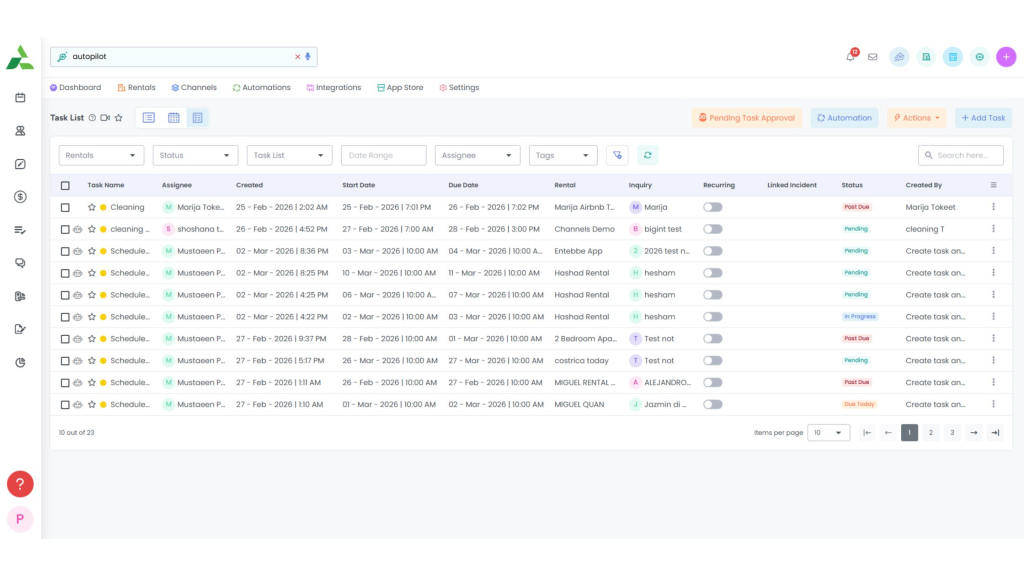
Task List in AdvanceCM: find and manage recurring ops work fast (including autopilot-driven workflows).
Running a business is for the owner who wants growth, not just “keeping up.” The Channel Manager and Enhanced Channel Connection Wizards make it easier to connect and manage major OTAs, Invoicing & Payments keep money flows inside the system, and the Documents/eSignature module lets you send rental agreements for signature and trigger related automations from the same vacation rental channel manager.
For more angles on how this all fits together, you can also skim our channel manager guides for hosts.
Advance Intelligence: AI Features You Don’t Get in TV3
Advance Intelligence is the AI layer that sits across messaging, tasks, and decisions in AdvanceCM. It offers smart reply suggestions, 24/7 guest responses, and the ability to generate warm, on-brand guest reviews with a click, so your team can handle more volume without feeling overloaded.
Over time, the AI learns from your interactions to match your tone and preferences, while future-facing capabilities like AI search and predictive analytics help you make smarter calls on pricing and operations.
If you want to see the full scope of what AI can do in the platform today, you can browse the Advanced Intelligence help section.
From TV3 to AdvanceCM: 5 Simple Steps to Upgrade
You don’t need a giant project plan to start your TV3 to AdvanceCM migration. Here’s a simple path to move with confidence, without pausing your current setup for even a day.
- Confirm your access
Make sure your account includes access to the new dashboard. If you’re unsure, check your account settings or contact support to confirm that AdvanceCM is already available under your existing plan. - Map how you use TV3 right now
List the parts of TV3 you touch every day, like which channels you manage, how you handle guest messages, how you assign tasks, and how you track payments. This turns the upgrade into a checklist instead of a mystery. - Log in and find your “familiar” tools.
Sign into your account, open AdvanceCM, and locate the calendar, Unified Inbox, and core settings you rely on. Your vacation rental channel manager will look cleaner, but the essentials are still there, you’re just seeing them in their modern layout. - Turn on the quick wins first
Start by using the Unified Inbox, basic automations, and your must-have integrations. This gives you immediate relief without changing every process at once and shows your team why the new view is worth it. - Layer in the rest of the 8 pillars over time
Once the basics feel comfortable, add more: deeper Autopilot rules, Smart Devices, Enhanced Channel Connection Wizards, vendors/charges/extras, AI-assisted messaging, the Documents module, and invoicing & payments. The goal is to grow into the full AdvanceCM feature set, not to flip your entire workflow overnight.
Start with one property. If you like to see something before touching your own setup, you can watch a host-led walkthrough in the upcoming TV3 to AdvanceCM migration webinar.
Try these steps on one property first →
What Changes (and What Stays the Same) When You Upgrade
On the surface, your vacation rental channel manager will look different. You’ll see a cleaner layout, clearer navigation, and new places where tasks, messages, and automations sit closer to each other.
What a busy day looks like in AdvanceCM
- A guest books on an OTA, and your rates and calendar update automatically through the Channel Manager and Enhanced Channel Connection Wizards.
- Autopilot rules send pre-arrival instructions, while smart devices handle access codes without you touching a thing.
- Your cleaner gets a task automatically, and any extra charges, vendors, or extras are tracked against the booking instead of living in a separate spreadsheet.
- If the guest asks a question at midnight, AI helps you respond quickly from the Unified Inbox, and if you need a signed document, you fire off a contract from the Documents module in a couple of clicks.
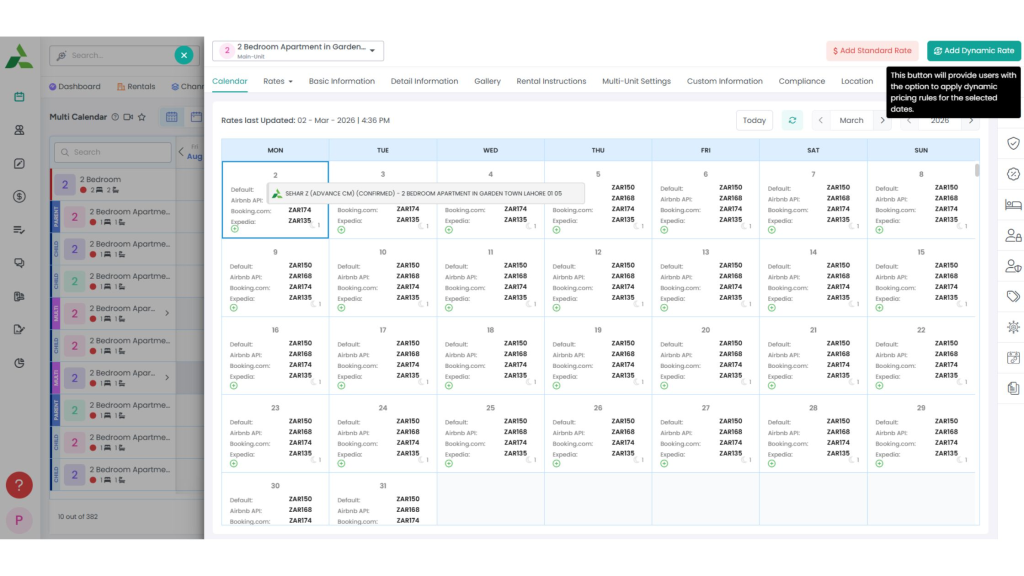
AdvanceCM multi-calendar with rate controls, including Dynamic Rates for faster pricing updates.
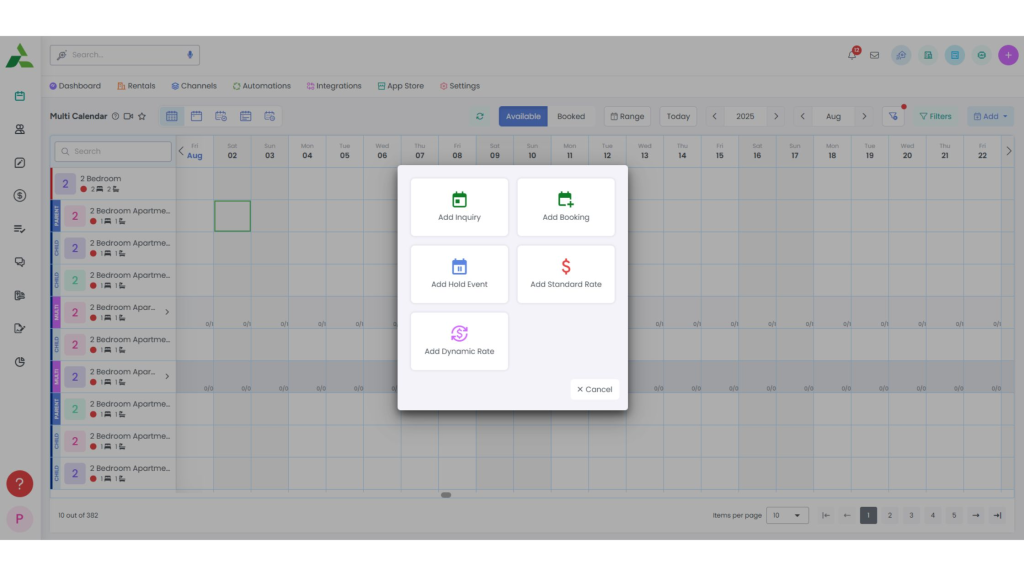
One-click calendar actions in AdvanceCM: add booking, inquiry, hold event, or rates without leaving the grid.
Under the hood, it’s still the same vacation rental channel manager connected to your listings, calendars, and guests. The TV3 to AdvanceCM migration keeps your core data and connections; you’re not rebuilding your business from scratch, you’re just running it on a version designed for 2026 instead of the one you set up years ago.
You’ll notice the biggest changes in how much of your day is manual. Messages that used to require a reminder can now be automated, tasks that used to be handled in chats or spreadsheets can move into the system, and contracts can be sent and signed digitally without adding another tool.
If you’re worried about breaking anything, you can move over in small, safe steps and keep TV3 as your mental backup while you learn the new screens.
Is AdvanceCM the Right Vacation Rental Channel Manager for You Right Now?
If you’re not sure whether to switch, start by looking at how you use your tools today. Are you constantly fixing things outside the system, extra spreadsheets, manual payment tracking, side chats with staff, and last-minute message checks?
You’re ready for the TV3 to AdvanceCM migration if any of these sound familiar. You’ve grown your listings or team, and TV3 feels cramped; you’ve asked for support for features that already exist in AdvanceCM (like the Unified Inbox and Smart Devices), or you’re spending more time managing the system than managing guests.
On the other hand, if you’re tiny, fully manual by choice, and only on a couple of channels, you might not feel the squeeze yet. But moving earlier can save you from a painful scramble later as demand grows. For more ideas, we break down practical automations in our vacation rental automation tips.
Your Next Move
The real risk isn’t the upgrade, it’s staying stuck in an older setup while your guests and competitors move on. The features you’ve been asking for already live in the modern vacation rental channel manager sitting one click away; you just need a safe way to step into it.
If you’re still on TV3 and even a little curious, this is your sign to log in, look around, and test a small part of your workflow in the newer layout. The TV3 to AdvanceCM migration doesn’t have to be a big-bang switch; it can be a series of calm steps you take over a week or two as you move your vacation rental channel manager onto the platform that can finally keep up.
Watch the walkthrough before you decide. →
FAQs
- Is AdvanceCM a completely new vacation rental channel manager or just an upgrade to TV3?
It’s the modern evolution of the same core platform you already use, with a focus on clarity, automation, smart devices, AI, and all eight feature pillars in one place. You’re not starting over; you’re moving your existing work into a stronger layout and engine. - Will switching to AdvanceCM disrupt my current reservations or channel connections?
The upgrade to AdvanceCM is designed to keep your core data and channels intact while you move into the new experience. As with any system change, you’ll want to double-check connections, but you shouldn’t be rebuilding your business from zero. - Do I need a big team to benefit from AdvanceCM?
No, single-host setups can still gain a lot from a unified inbox, simple automations, and better visibility. A solid system like AdvanceCM just becomes more valuable as your portfolio and team grow. - What’s the fastest way to get value from AdvanceCM if I’m busy?
Start with the quick wins: use the Unified Inbox, basic scheduled messages, Smart Devices, and task tracking for your cleaners or front desk. Those three moves alone can take a chunk of stress off your plate without redesigning your entire workflow. - How does the TV3 to AdvanceCM migration webinar actually help me decide?
The webinar gives you a live, side-by-side walkthrough from TV3 into the new screens, so you can see exactly “where things are” before touching your setup. It’s also your chance to ask questions about your specific use case and see how a modern vacation rental channel manager handles it in real time.

Welcome to Tokeet’s Podcast — your trusted source for insights, trends, and strategies shaping the vacation rental industry. Each episode features expert interviews, data-driven analysis, and practical tips to help property managers grow their businesses, improve guest experiences, and stay ahead in a rapidly evolving market. Whether you’re new to short-term rentals or managing a large portfolio, tune in to stay informed and inspired.
Some days just don’t work for a guest arrival, whether it’s a holiday, a maintenance window, or a turnover day your team can’t cover. This episode walks through check-in and check-out restrictions, the most requested feature in AdvanceCM, now live in the Rentals module. You’ll hear how to block arrivals or departures for a date range, such as December 24 to 26, and how to allow check-ins only on the weekdays you choose. We also cover channel-specific rules, like keeping Airbnb to Friday and Saturday arrivals while direct bookings stay open through Sunday. Finally, we explain what to check before switching rules on, from existing reservations to sync time and visibility on booking sites.
Key Takeaways:
✅ Block check-ins or check-outs for any date range
✅ Limit arrivals to the weekdays you choose
✅ Set different rules for each booking channel
✅ Existing reservations stay unchanged
✅ More restrictions mean fewer guests can book, so review rules each season
Related Links:
Company: https://www.tokeet.com/Blogs: https://www.tokeet.com/blog/Blog: Check-in and Check-out Restrictions: How to Set Them in AdvanceCM 👉 https://blog.tokeet.com/check-in-and-check-out-restrictions/
This is a public episode. If you would like to discuss this with other subscribers or get access to bonus episodes, visit podcast.tokeet.com


