
 [/vc_column_text][vc_column_text single_style=”1″ el_class=”cheetosx”]
What does Rategenie do?
[/vc_column_text][vc_column_text single_style=”1″ el_class=”cheetosx”]Rategenie is a sophisticated rate manager that allows users to easily set up dynamic pricing strategies across their entire rental inventory. Once a strategy is chosen, you simply sit back and let Rategenie drive your bookings and fill your calendar.While it’s simple to use, Rategenie relies on an intricate system of rules and triggers to arrive on the perfect pricing for your rental every day. Users have the capability of adjusting and creating their own rate strategies to best suit their needs.
Rategenie has regularly improved rental revenues up to 30% over flat rates and manual strategies! The app also provides metrics and local market research to ensure your strategy is effective and always on top of the competition.[/vc_column_text][vc_empty_space][vc_column_text single_style=”1″ el_class=”cheetosx”]
Where can I get Rategenie?
[/vc_column_text][vc_column_text single_style=”1″ el_class=”cheetosx”]Rategenie is a fully integrated add-on app for Tokeet users. Simply log in to your Tokeet dashboard, select Rategenie from the Add Ons menu, and you’re on your way. It’s that simple![/vc_column_text][vc_column_text single_style=”1″ el_class=”cheetosx”]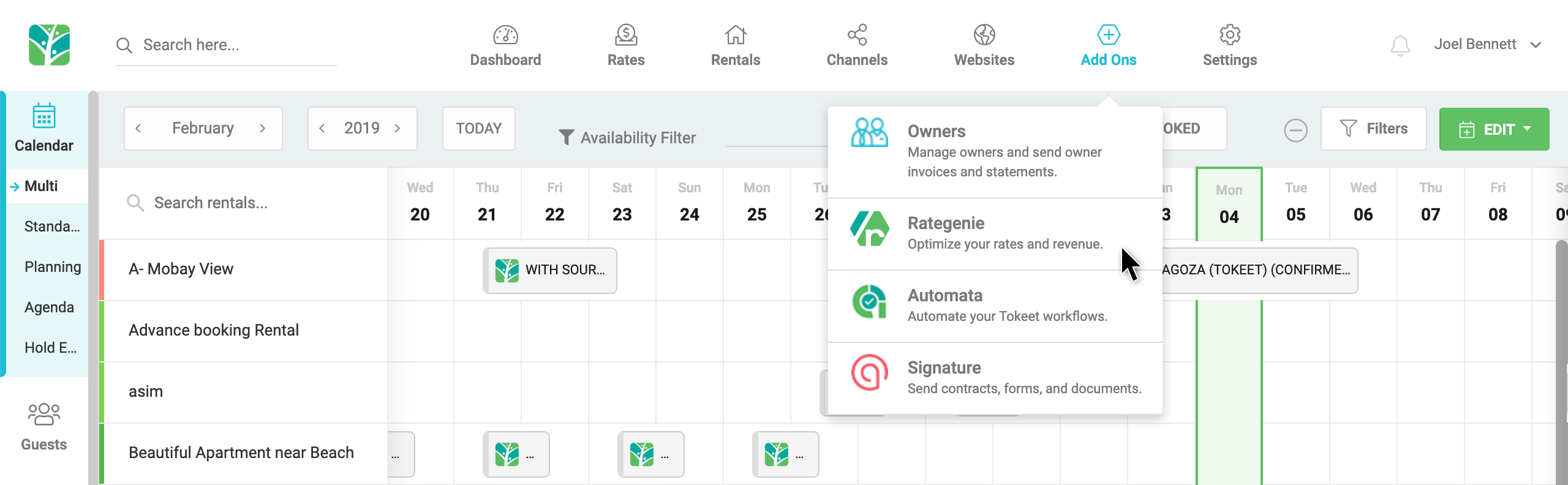
Simply hover over the Add On menu and select Rategenie!
For more on Rategenie’s features and pricing, please visit Rategenie.io.
[/vc_column_text][/vc_column][/vc_row]
Welcome to Tokeet’s Podcast — your trusted source for insights, trends, and strategies shaping the vacation rental industry. Each episode features expert interviews, data-driven analysis, and practical tips to help property managers grow their businesses, improve guest experiences, and stay ahead in a rapidly evolving market. Whether you’re new to short-term rentals or managing a large portfolio, tune in to stay informed and inspired.
Some days just don’t work for a guest arrival, whether it’s a holiday, a maintenance window, or a turnover day your team can’t cover. This episode walks through check-in and check-out restrictions, the most requested feature in AdvanceCM, now live in the Rentals module. You’ll hear how to block arrivals or departures for a date range, such as December 24 to 26, and how to allow check-ins only on the weekdays you choose. We also cover channel-specific rules, like keeping Airbnb to Friday and Saturday arrivals while direct bookings stay open through Sunday. Finally, we explain what to check before switching rules on, from existing reservations to sync time and visibility on booking sites.
Key Takeaways:
✅ Block check-ins or check-outs for any date range
✅ Limit arrivals to the weekdays you choose
✅ Set different rules for each booking channel
✅ Existing reservations stay unchanged
✅ More restrictions mean fewer guests can book, so review rules each season
Related Links:
Company: https://www.tokeet.com/Blogs: https://www.tokeet.com/blog/Blog: Check-in and Check-out Restrictions: How to Set Them in AdvanceCM 👉 https://blog.tokeet.com/check-in-and-check-out-restrictions/
This is a public episode. If you would like to discuss this with other subscribers or get access to bonus episodes, visit podcast.tokeet.com


