

Airbnb review automation is the fastest way to stop losing reviews just because you got busy between checkouts. When you’re juggling multiple properties, every missed review quietly hurts your visibility, social proof, and even your Superhost goals.
This guide shows you how to use Airbnb review automation to handle routine feedback, keep Airbnb guest reviews consistent, and still stay in control when a stay isn’t perfect. When you’re ready, you can let the system handle repetitive follow-up so your team can focus on operations and guest experience instead.
See the steps →
Why Airbnb review automation matters for real-world hosting
Most guests won’t say it out loud, but they expect a long history of Airbnb guest reviews before they book. Travel outlets like Travel + Leisure regularly show how strongly reviews shape booking decisions, especially when listings look similar on the surface. When you keep reviews flowing, you give future guests a clear reason to choose your place instead of the one next door.
The problem is the day-to-day grind: messages, cleaners, check-ins, pricing updates, and last-minute requests. Writing one more review from scratch can feel like the thing you’ll “come back to later,” and that’s how one or two missed stays turn into weeks of silence from your side on Airbnb. Airbnb review automation turns reviews into a repeatable rule instead of a daily task you have to remember, and it works nicely alongside your core Airbnb hosting tips.
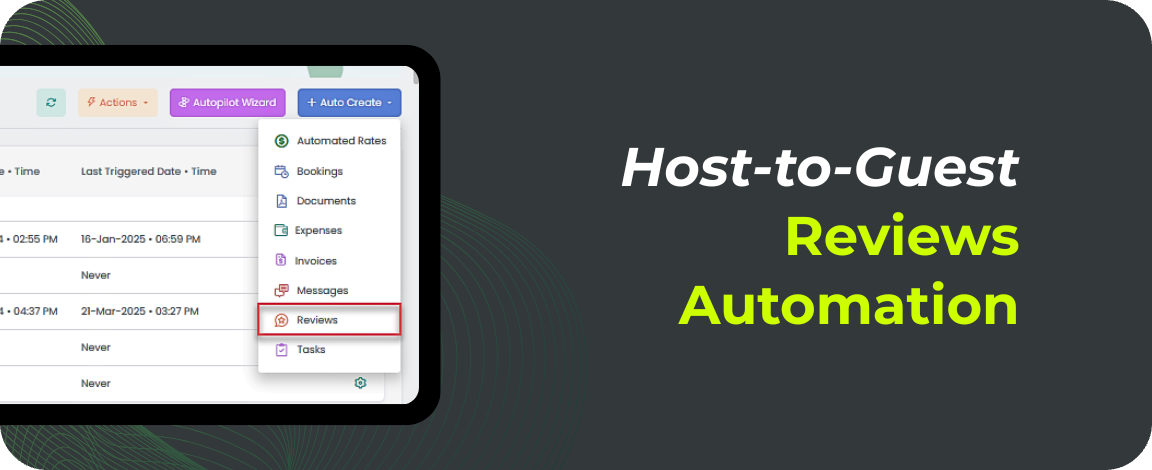
Set up host-to-guest Airbnb review automation in the AdvanceCM Reviews module.
Before:
Scrambling to remember who checked out and whether you already wrote a review
Writing last-minute, generic lines that don’t reflect your brand
After:
Consistent Airbnb review automation sending feedback on time
Short, on-brand reviews that support your Superhost and ranking goals
5 steps to set up Airbnb review automation
First, decide where you want Airbnb review automation to run. Start with one or two listings where most stays are smooth—think 4 or 5 stars, no disputes, and no major house rule issues—and use that profile to decide which bookings are safe to automate and which Airbnb guest reviews should stay manual.
Step 1: Choose which stays to automate.
Pick listings or guest types that rarely cause problems, like repeat guests or business travelers. Avoid automating stays where you often see noise, parties, or rule issues.
Step 2: Build your review templates.
Create a few templates that pair a specific star rating with a short message. Have at least one for excellent stays, one for solid but not perfect stays, and one neutral option for “fine, but not amazing” visits.
Step 3: Set your timing rules.
Decide when to send reviews, like 1–3 days after checkout while the stay is still fresh. This keeps you inside Airbnb’s review window and nudges guests to respond while the experience is top of mind.
Step 4: Connect your ratings to the right template.
In your channel manager, you assign a rating after checkout and let rules choose the message. If you’re using Airbnb review automation inside AdvanceCM, a 5-star rating can trigger a warm, detailed review without you typing anything.
Step 5: Test, review, then scale.
Run Airbnb review automation on a handful of stays and read the reviews that went out. Make small tweaks so the tone sounds like you, then roll it out to more listings once you’re comfortable.
Start with one property so you can see the impact without changing your whole workflow—no workflow overhaul needed. Once you’re happy with how those automated reviews look, expand your Airbnb review automation rules to more units and let the system handle routine feedback while you focus on edge cases.
Templates and AI: writing better Airbnb guest reviews at scale
Templates are how you make automation feel personal instead of robotic. A solid template for Airbnb guest reviews has three parts: a quick greeting with the guest’s name, one specific detail about the stay (cleanliness, communication, or how they treated the space), and a short closing line inviting them back, similar to the examples in our Airbnb guest review strategies.
If you’re using AI, you can go one step further and have it suggest wording based on your preferences. With tools like Advance Intelligence, you set your tone once; friendly, concise, or more formal, and let AI draft the body of the review while you stay in control of the star rating. AI is great at turning quick notes into complete Airbnb guest reviews that sound consistent across your team, so you’re not staring at an empty text box after every checkout.
Staying in control of low ratings and exceptions
Airbnb review automation doesn’t mean every guest gets a glowing message. You can, and should—keep exceptions on manual review so you’re not locked into a positive template when someone breaks house rules or causes damage. A simple rule is to automate 4–5-star stays and send anything 3 stars or lower to a manual queue before a review goes out.
You can also tighten the rules for certain properties or seasons. For example, you might only automate Airbnb guest reviews for longtime repeat guests at a high-end listing while you keep a closer eye on first-time bookings or peak-season stays. If a stay feels off, you can always skip assigning a rating in your system and handle that review directly inside Airbnb or pair automation with other vacation rental automation ideas.
Conclusion
Airbnb review automation takes one of the most repetitive hosting tasks and turns it into a background process you can rely on. Instead of chasing the review window or forgetting stays during busy weeks, you send consistent, on-time Airbnb guest reviews that support your ranking, click-throughs, and guest trust. When you plug Airbnb review automation into tools like AdvanceCM, you keep control of ratings and tricky edge cases while the system handles routine follow-up and standard stays.
Turn it on when you’re ready. →
FAQs
- Does Airbnb allow review automation tools like AdvanceCM?
Yes, Airbnb allows hosts to use channel managers and connected tools that help manage bookings and communication as long as they follow platform rules. Airbnb review automation in AdvanceCM still uses your own ratings and templates; it simply handles the sending for you. - Will Airbnb review automation make my reviews sound robotic?
Not if you set it up properly. When you write clear, natural templates for Airbnb guest reviews and use AI as a helper instead of a replacement, automation just makes sure those human-sounding reviews go out on time. - Can I stop an automated review from going out after a bad stay?
Yes, you stay in control by choosing when to assign a rating and which stays following automation rules. If a stay was difficult, you can leave it out of Airbnb review automation and write a manual review instead. - Does Airbnb review automation help with Superhost or search ranking?
Automating reviews doesn’t guarantee Superhost, but it does help you stay active and consistent, which supports your overall performance metrics. More timely Airbnb guest reviews can also improve conversion and make your listing more attractive when guests compare options. - Is Airbnb review automation only for Airbnb, or will it work on other channels too?
Right now, this workflow focuses on Airbnb bookings because of how reviews are built into the platform. As your stack grows, you can still use the same ideas; templates, rules, and AI—to streamline reviews and messaging on other channels, even if the exact automation setup looks a bit different.

Welcome to Tokeet’s Podcast — your trusted source for insights, trends, and strategies shaping the vacation rental industry. Each episode features expert interviews, data-driven analysis, and practical tips to help property managers grow their businesses, improve guest experiences, and stay ahead in a rapidly evolving market. Whether you’re new to short-term rentals or managing a large portfolio, tune in to stay informed and inspired.
Some days just don’t work for a guest arrival, whether it’s a holiday, a maintenance window, or a turnover day your team can’t cover. This episode walks through check-in and check-out restrictions, the most requested feature in AdvanceCM, now live in the Rentals module. You’ll hear how to block arrivals or departures for a date range, such as December 24 to 26, and how to allow check-ins only on the weekdays you choose. We also cover channel-specific rules, like keeping Airbnb to Friday and Saturday arrivals while direct bookings stay open through Sunday. Finally, we explain what to check before switching rules on, from existing reservations to sync time and visibility on booking sites.
Key Takeaways:
✅ Block check-ins or check-outs for any date range
✅ Limit arrivals to the weekdays you choose
✅ Set different rules for each booking channel
✅ Existing reservations stay unchanged
✅ More restrictions mean fewer guests can book, so review rules each season
Related Links:
Company: https://www.tokeet.com/Blogs: https://www.tokeet.com/blog/Blog: Check-in and Check-out Restrictions: How to Set Them in AdvanceCM 👉 https://blog.tokeet.com/check-in-and-check-out-restrictions/
This is a public episode. If you would like to discuss this with other subscribers or get access to bonus episodes, visit podcast.tokeet.com


