
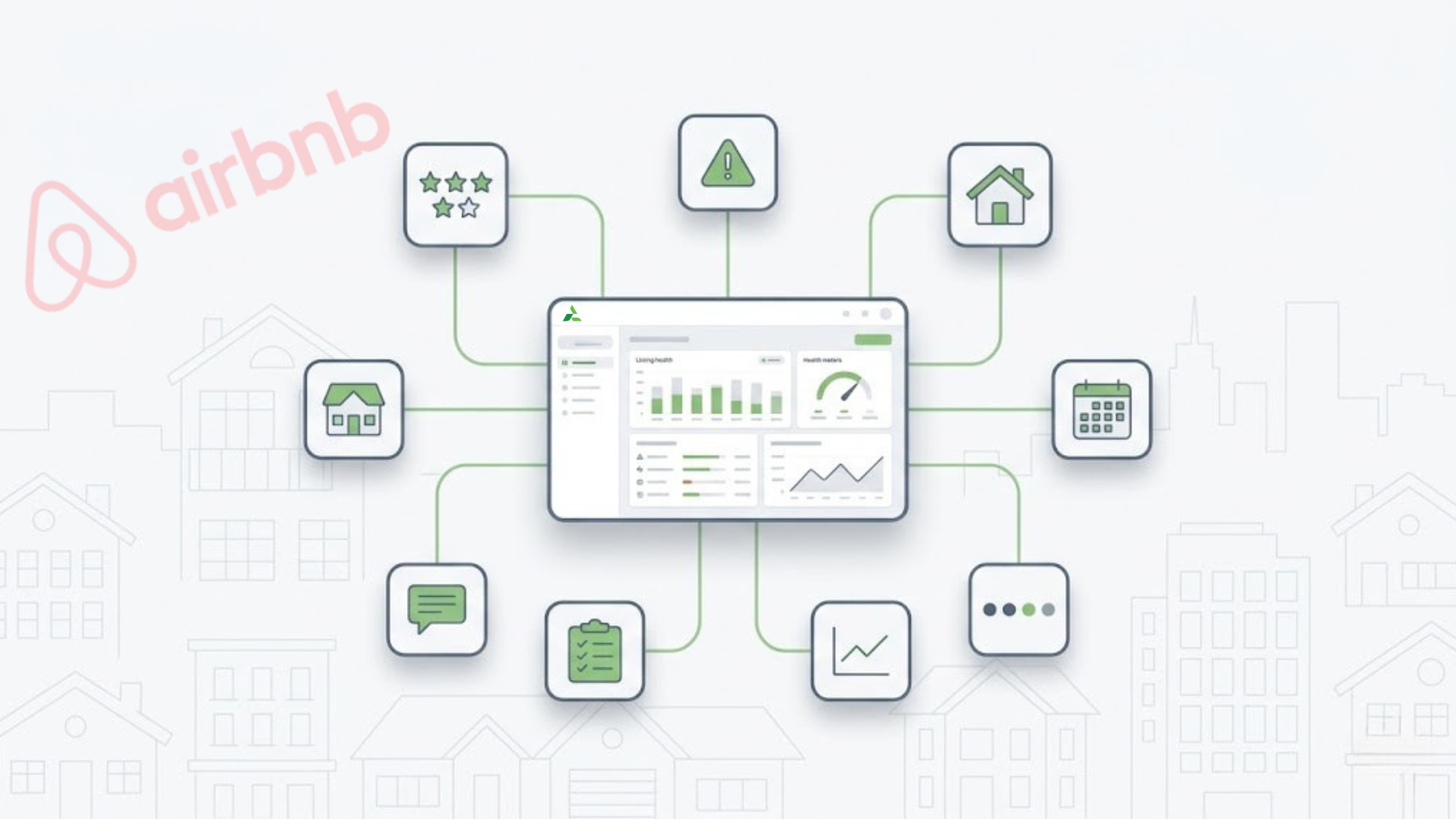
The Airbnb Quality Dashboard is where small guest complaints start looking like booking risks. Listings rarely drop overnight. The warning signs usually show up first in ratings, review tags, guest comments, quality status, and repeated support issues.
For property managers, the problem is not one negative review. It is scattered signals across listings, inboxes, tasks, and teams. To monitor connected listings from one place, review how the channel manager keeps Airbnb data easier to track across your portfolio.
The Airbnb Quality Dashboard shows listing health signals such as quality status, 5-star review trends, listing issues, and guest feedback patterns. In AdvanceCM, those signals become easier to review across connected listings, so managers can spot risks before they affect Airbnb listing performance, search visibility, or guest trust.
What the Airbnb Quality Dashboard Shows Hosts
Airbnb says its professional hosting tools can track 5-star ratings across categories such as accuracy, check-in, cleanliness, communication, location, and value in its guide to quality and performance data for homes.
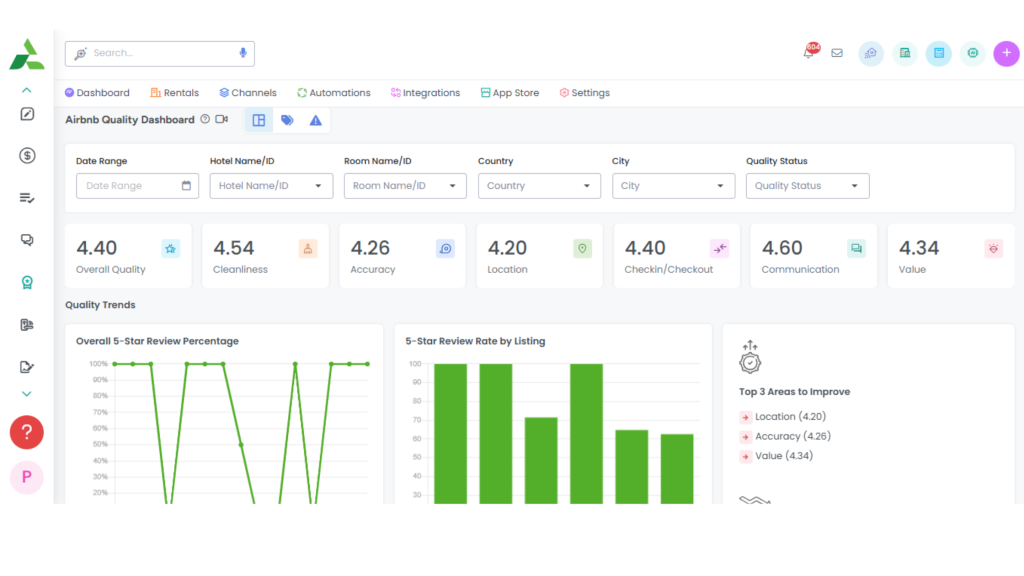
AdvanceCM’s Airbnb Quality Dashboard shows quality scores, review trends, filters, and improvement areas across connected listings.
The main signals to watch are the following:
- Quality status: Whether a listing is in a stable or risk state.
- 5-star review percentage: How often guests leave top ratings.
- Review rates by listing: Which properties are slipping faster than others.
- Listing issues: The specific reviews or complaints tied to quality changes.
- Review tags: Guest-selected clues like unclear check-in, cleanliness issues, or missing amenities.
- Category ratings: Accuracy, cleanliness, check-in, communication, location, value, and overall rating.
The key is not just seeing the data. The key is knowing what to do next.
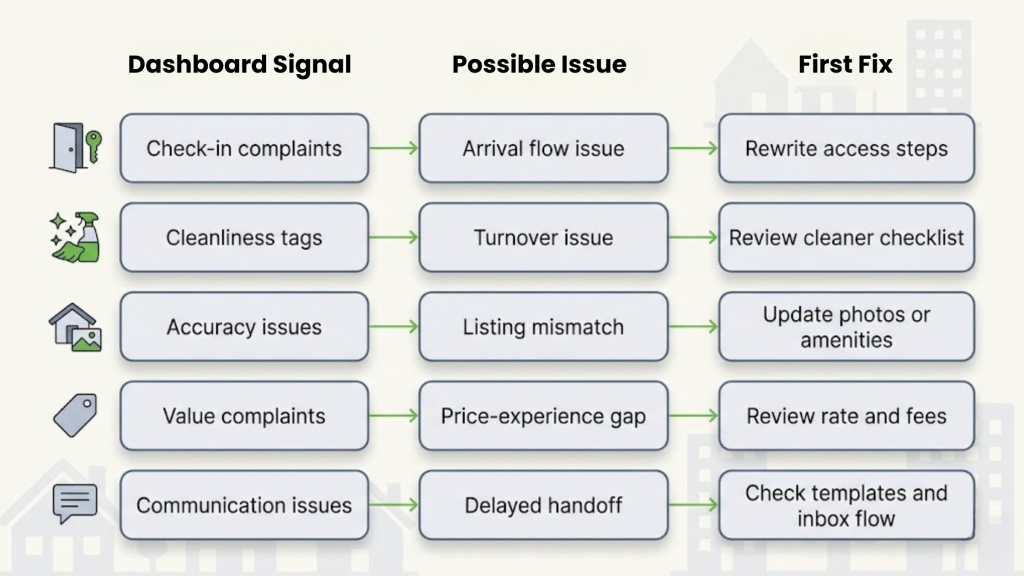
A cleanliness tag should trigger a cleaning review. A check-in complaint should trigger an instruction audit. A value complaint should trigger a price-to-property inspection. That is how the Airbnb Quality Dashboard becomes an operating tool instead of another report.
Why Quality Signals Affect Airbnb Listing Performance
Airbnb listing performance depends on more than price. Guests need to find the listing, trust the listing, book the listing, and leave satisfied enough to protect the next booking cycle.
Airbnb explains that its search results use an algorithm to match guests with relevant listings based on search criteria and many ranking signals in its guide on how search results work.
That matters because quality issues do not stay inside the review tab. They can affect how guests read your listing, how confidently they book, and how much risk the platform sees in that property.
Here is the trap: many hosts only check revenue after bookings slow down. By then, the Airbnb Quality Dashboard may have already shown the early warning signs.
A low check-in score may mean instructions are unclear. A low accuracy score may mean the photos or amenities are outdated. A low value score may mean the nightly rate has moved faster than the guest experience. A drop in overall rating may mean the stay feels weaker than the listing promises.
If value complaints keep repeating, compare guest feedback against pricing and calendar pressure using this Airbnb occupancy rate guide and benchmarks.
None of these problems require panic. They require a workflow.
The Risk Patterns Hosts Should Catch Early
Most listing problems begin as small patterns. One complaint may be noise. Repeated complaints point to an operating issue.
This is where relevance matters. A dashboard signal should never sit alone. It should point to the next operational action.
Airbnb Quality Dashboard Statuses to Watch
The Airbnb Quality Dashboard is useful because it turns listing health into visible status changes. Those labels help teams decide whether a listing needs routine monitoring, a quick fix, or urgent recovery.
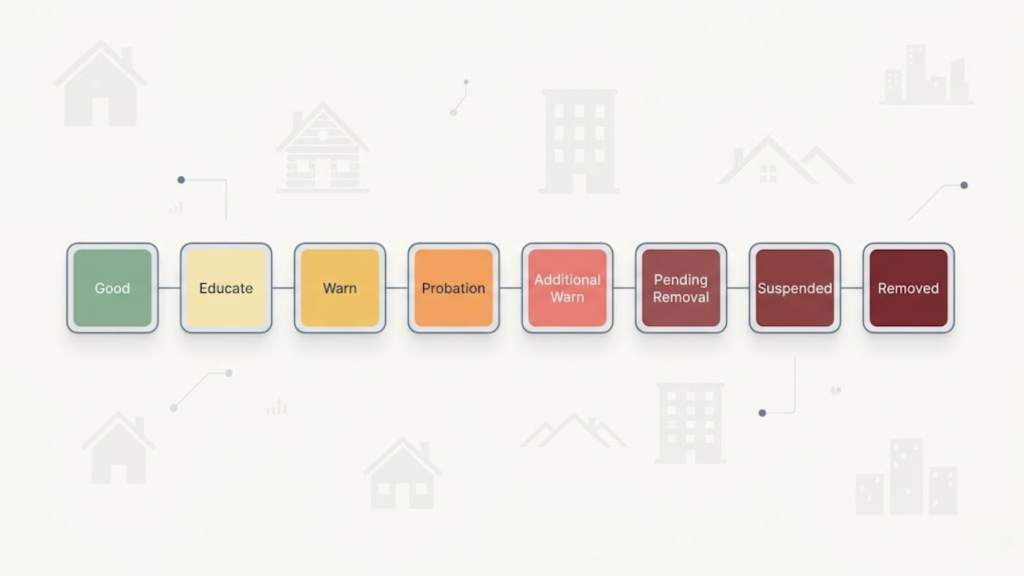
Do not treat “Educate” or “Warn” as paperwork. Treat them as early operating signals.
The Airbnb Quality Dashboard helps answer three practical questions:
- What changed?
- Which listing is affected?
- What operational fix should happen next?
That is the difference between checking reviews and managing Airbnb listing performance.
How AdvanceCM Turns Signals Into Tasks
This is where AdvanceCM fits into the workflow.
A single host can check one Airbnb account manually. A property manager handling multiple listings needs a system that connects guest feedback, review tags, messages, and tasks before patterns get missed.
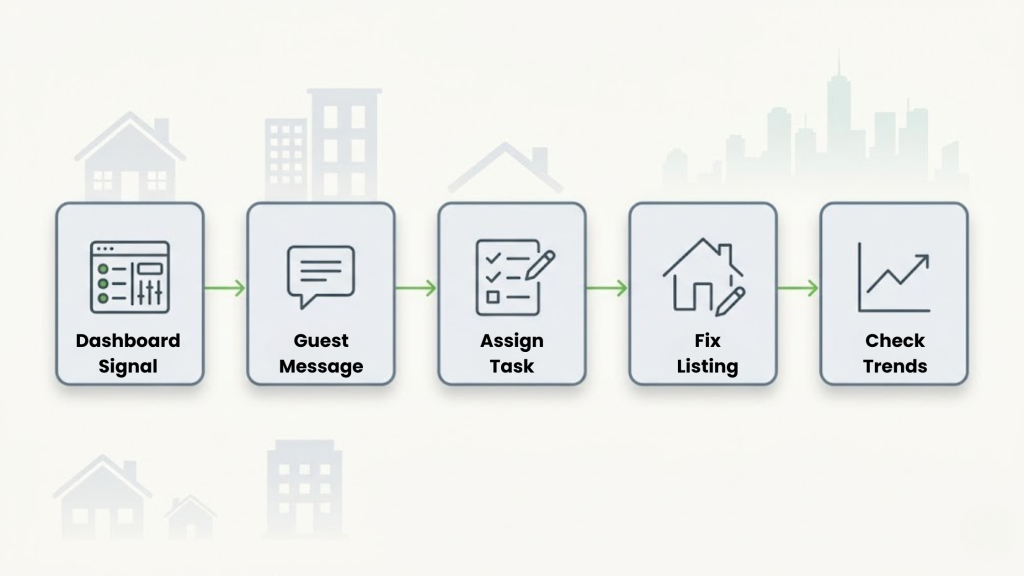
AdvanceCM helps reduce that gap by turning dashboard signals into operational checks. A cleanliness tag can trigger a turnover review. A check-in complaint can lead to updated arrival instructions. A repeated value concern can push the team to review rates, fees, amenities, or listing accuracy.
For teams that handle disputes or repeated guest questions, the unified inbox keeps message history easier to review alongside the reservation context.
That matters because review responses should be based on facts, not memory. For problem stays, pair message history with a clear Airbnb guest review strategy so timing, wording, and documentation stay consistent. The Airbnb Quality Dashboard shows the signal. The workflow decides whether that signal becomes a fix.
Want to see the workflow inside AdvanceCM? Review the Airbnb Quality Dashboard help article
How to Use the Airbnb Quality Dashboard Before Bookings Drop
Use the Airbnb Quality Dashboard as a weekly operating check, not an emergency screen.
1. Check quality status first.
Start with the status labels. Good means the listing is stable, not finished. “Educate,” “Warn,” “Probation,” and “Pending Removal” need review before they become larger booking problems.
2. Review listing issues by property
Do not scan the portfolio as one blob. Sort by listing and look for the property creating the most friction. One weak unit can drag management attention away from stronger performers.
3. Match review tags to rating categories
Every tag should map to a guest-facing category. “Unclear instructions” belongs to check-in. “Dust” belongs to cleanliness. “Missing amenity” belongs to accuracy or value.
4. Read the recent guest messages.
The dashboard can show the warning, but the inbox often explains why it happened. Look for repeated questions, late replies, confusion about access, or unresolved complaints.
5. Separate one-off complaints from patterns
One difficult guest is not a system failure. Three guests mentioning the same check-in issue is a system failure. Patterns deserve process changes.
6. Assign the operational fix.
Do not leave the fix as “monitor this.” Make it specific. Update the guidebook. Re-shoot the outdated photo. Confirm the amenity works. Add a cleaning photo requirement. Adjust the rate if value complaints are tied to price.
7. Recheck after the next review cycle.
The fix is not complete when the task is marked done. It is complete when guest feedback stops repeating the same problem. That is how the Airbnb Quality Dashboard supports better Airbnb listing performance over time.
For routine review and message workflows, message and review autopilots can handle standard follow-ups while your team focuses on listings that show risk.
Conclusion
The Airbnb Quality Dashboard is not just a reporting screen. It is an early-warning system for review problems, listing health issues and Airbnb listing performance risks.
Most listing problems do not begin as platform penalties. They begin as small patterns: one check-in complaint, one cleanliness tag, one unanswered message, one value concern.
You don’t need new tools to start—just fix the edge cases first. But once you manage more listings, the edge cases multiply.
AdvanceCM helps teams connect those signals to action before small issues become repeated complaints. The goal is simple: see the risk, assign the fix, and protect the listing before bookings drop.
To manage listing health across more properties, review how the AdvanceCM channel manager keeps Airbnb operations connected.
FAQs
- What is the Airbnb Quality Dashboard?
The Airbnb Quality Dashboard is a performance view that helps hosts track listing health signals such as rating trends, review categories, listing issues, and quality status. Property managers use it to spot guest experience problems before they become larger visibility or booking risks. - Does the Airbnb Quality Dashboard affect search rankings?
The dashboard itself is not the ranking algorithm. But the signals it tracks, such as ratings, guest feedback, and listing issues, can point to problems that may affect Airbnb listing performance. - What Airbnb quality status should hosts worry about most?
Probation, Additional Warning, Pending Removal, Suspended, and Removed deserve fast attention because they suggest the listing may be at platform risk. Educate and Warn should also be reviewed early because they can show the start of a repeated issue. - How does AdvanceCM help with Airbnb listing performance?
AdvanceCM helps property managers connect guest messages, listing context, review workflows, and operational tasks. That makes it easier to turn dashboard signals into fixes instead of leaving them buried in separate tools. - How often should property managers check listing health?
A weekly check is a practical rhythm for active listings. During high season, after a bad review, or when a listing moves into a warning status, managers should review the Airbnb Quality Dashboard more often.

Welcome to Tokeet’s Podcast — your trusted source for insights, trends, and strategies shaping the vacation rental industry. Each episode features expert interviews, data-driven analysis, and practical tips to help property managers grow their businesses, improve guest experiences, and stay ahead in a rapidly evolving market. Whether you’re new to short-term rentals or managing a large portfolio, tune in to stay informed and inspired.
Some days just don’t work for a guest arrival, whether it’s a holiday, a maintenance window, or a turnover day your team can’t cover. This episode walks through check-in and check-out restrictions, the most requested feature in AdvanceCM, now live in the Rentals module. You’ll hear how to block arrivals or departures for a date range, such as December 24 to 26, and how to allow check-ins only on the weekdays you choose. We also cover channel-specific rules, like keeping Airbnb to Friday and Saturday arrivals while direct bookings stay open through Sunday. Finally, we explain what to check before switching rules on, from existing reservations to sync time and visibility on booking sites.
Key Takeaways:
✅ Block check-ins or check-outs for any date range
✅ Limit arrivals to the weekdays you choose
✅ Set different rules for each booking channel
✅ Existing reservations stay unchanged
✅ More restrictions mean fewer guests can book, so review rules each season
Related Links:
Company: https://www.tokeet.com/Blogs: https://www.tokeet.com/blog/Blog: Check-in and Check-out Restrictions: How to Set Them in AdvanceCM 👉 https://blog.tokeet.com/check-in-and-check-out-restrictions/
This is a public episode. If you would like to discuss this with other subscribers or get access to bonus episodes, visit podcast.tokeet.com


