
Airbnb discounts lower the price for guests under specific conditions: a new listing, a guest with strong reviews, a booking made far ahead, or a stay that starts soon. AdvanceCM, Tokeet’s AI-powered property management system and channel manager, lets you manage several of them for Airbnb-connected listings without logging in to Airbnb separately.
This guide covers what each discount does, when it fits, how the discounts combine, and where to find them in AdvanceCM. Each of these Airbnb discounts answers a different calendar problem, so the useful question is not “should I discount?” but “which discount, for which dates?”
AdvanceCM supports five Airbnb discounts for connected listings: the New Listing Promotion (20% off until a new listing earns three reviews or reaches 10 bookings), the Top-Rated Guests Discount (15% for guests rated 4.8★ or higher with at least three reviews), early bird and last-minute discounts, and Airbnb’s 10% Mobile-Only Discount. The first one and the two timing discounts sit in the listing’s Airbnb Price Settings, and the Top-Rated Guests Discount can be switched on or off from AdvanceCM too.
Which Airbnb Discounts AdvanceCM Supports
| Discount | Who it reaches | Discount | Where it’s managed in AdvanceCM |
|---|---|---|---|
| New Listing Promotion | New listings with Smart Pricing off | 20% until 3 reviews or 10 bookings, for stays within 180 days of creation | Price Settings toggle, or during listing creation |
| Top-Rated Guests Discount | Guests rated 4.8★ or higher with at least 3 reviews | 15% | Switched on or off from AdvanceCM |
| Early bird discount | Guests who book well ahead | You choose | Price Settings, under Pricing Rules |
| Last-minute discount | Guests who book close to check-in | You choose | Price Settings, under Pricing Rules |
| Mobile-Only Discount | Guests who book in the Airbnb mobile app | 10%, set by Airbnb | Supported through Airbnb’s Promotions API |
Weekly and monthly discounts are not on this list. AdvanceCM no longer manages them, so set those directly in Airbnb.
New Listing Promotion: Help a New Rental Get Its First Bookings
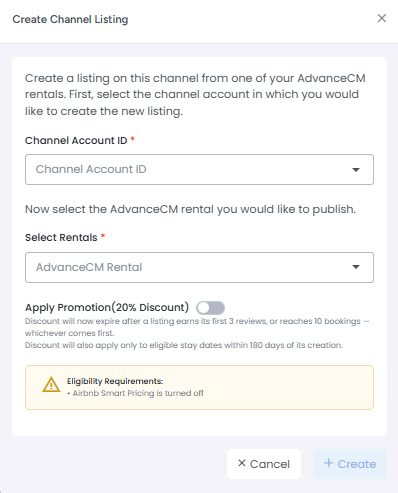
The New Listing Promotion gives guests 20% off a new listing until it earns its first three reviews or reaches 10 bookings, whichever comes first. The discount applies only to stay dates within 180 days of the listing’s creation. AdvanceCM applies it through Airbnb’s Promotions API, and the promotion expires automatically once either limit is reached.
A listing qualifies when Airbnb Smart Pricing is turned off and the promotion has not already expired. If either condition fails, the toggle is disabled and AdvanceCM explains why, for example: “Smart Pricing must be turned off to enable this promotion.”
If any condition fails, the toggle is disabled and AdvanceCM explains why, for example that Smart Pricing must be turned off first
You can switch the promotion on in two places: in Price Settings for an existing Airbnb listing, or in the Create Listing view when you publish a rental to Airbnb from AdvanceCM. During listing creation the toggle is off by default, and once you switch it on, the promotion applies as soon as Airbnb creates the listing. AdvanceCM’s help article on the New Listing Promotion covers each toggle state.
You can turn the promotion off at any time. Future bookings then pay the regular price, and bookings already made with the discount stay unchanged.
First bookings matter beyond the revenue they bring in. Our guide to what Airbnb’s search algorithm rewards explains why early reviews carry extra weight for new listings, and a listing needs bookings before it can collect reviews. If some of your rentals are not on Airbnb yet, publishing them from AdvanceCM lets you switch the promotion on during setup.
Top-Rated Guests Discount: Reach Guests With Strong Reviews
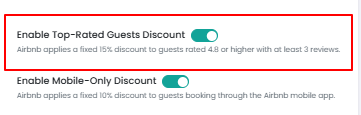
The Top-Rated Guests Discount offers 15% off to guests with an average rating of 4.8★ or higher and at least three completed reviews. Once you turn it on, eligible guests receive it automatically. AdvanceCM added support for it in its August 2026 update: you can enable or disable the discount from AdvanceCM, and the setting stays synced with Airbnb.
The appeal is who the discount reaches. A guest’s rating comes from the reviews previous hosts wrote after each stay. Our post on Airbnb reviews for guests explains how those reviews give other hosts a record of how a guest communicated, followed house rules, and left the property.
It is also the only one Airbnb lets you combine with the others, as the section on how Airbnb discounts combine explains below.
Early Bird and Last-Minute Discounts: Two Ends of the Calendar
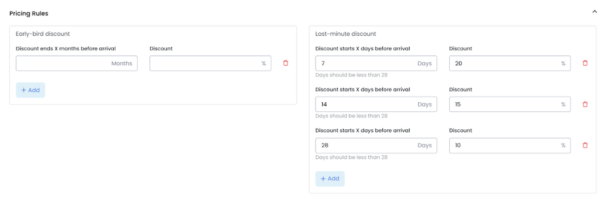
Early bird and last-minute discounts target booking timing rather than a type of listing or guest. Airbnb’s guide to its pricing tools says an early bird discount can cover bookings made between 1 and 24 months in advance, and a last-minute discount can cover bookings made between 1 and 28 days before check-in.
Airbnb positions the early bird discount for guests who plan ahead and the last-minute discount for filling gaps in your calendar. In AdvanceCM, both sit under Pricing Rules in the listing’s Airbnb Price Settings, and they sync with the “More Discounts” section of Airbnb’s Pricing and Availability settings.
Mobile-Only Discount
Airbnb’s Mobile-Only Discount gives 10% off to guests who book through the Airbnb mobile app. Unlike the other Airbnb discounts here, the rate is set by Airbnb, and hosts cannot change it. AdvanceCM supports this promotion type through Airbnb’s Promotions API, so it is recognized for your Airbnb-connected listings alongside your other settings.
How Airbnb Discounts Combine
Airbnb’s help center article on how discounts are applied sets a clear rule for homes: only one of the main Airbnb discounts can apply to a reservation. That group includes the New Listing Promotion, custom promotions, length-of-stay discounts, early bird discounts, and last-minute discounts. The Top-Rated Guests Discount is the exception, because it can combine with any of them.
In practice, setting an early bird and a last-minute discount on the same dates will not double the reduction for one guest. Plan each of your Airbnb discounts for the dates and guests it is meant to reach.
How to Set Airbnb Discounts in AdvanceCM
Most of these settings live in one place for each listing:
- Go to the Channels page and select Airbnb in the left navigation.
- Open the Connection Details for the listing you want to update.
- Click Actions, then Price Settings.
- Use the “Apply Promotion – 20% Discount” toggle for the New Listing Promotion, or Pricing Rules for early bird and last-minute discounts.
Price Settings also shows the values currently set in Airbnb, so you can check what is live before you change anything. The Top-Rated Guests Discount is switched on or off from AdvanceCM as well.
These settings reach Airbnb through the API connection behind the AdvanceCM Channel Manager, which connects each rental to Airbnb and your other booking channels from one account.
Choosing the Right Airbnb Discount
Match the discount to the problem you are trying to solve:
- A rental is going live on Airbnb: New Listing Promotion, with Smart Pricing turned off first.
- You want more bookings from guests with a strong review history: Top-Rated Guests Discount.
- Dates months away are slow to book: early bird discount.
- Short gaps are open in the next few weeks: last-minute discount.
Avoid using Airbnb discounts as a permanent fix for a weak calendar. Our Airbnb occupancy rate guide makes the case that one permanent discount is usually a blunt fix, and that the listing, stay rules, and booking pace deserve a look first. Change one discount at a time so you can see what it did.
Next Step
Open Price Settings for one Airbnb listing in AdvanceCM and check which Airbnb discounts are already on. Then pick the one that matches that listing’s most obvious gap. To see how AdvanceCM keeps your Airbnb listings connected with your other channels, visit the AdvanceCM Channel Manager page.
FAQs
- Which Airbnb discounts can I manage from AdvanceCM? The New Listing Promotion, the Top-Rated Guests Discount, early bird discounts, and last-minute discounts. AdvanceCM also supports Airbnb’s Mobile-Only Discount, which Airbnb sets at 10%. Weekly and monthly discounts are set directly in Airbnb.
- Can I combine Airbnb discounts? Only partly. Airbnb applies one main discount per reservation, such as the New Listing Promotion, an early bird discount, or a last-minute discount. The Top-Rated Guests Discount can combine with any of them.
- Why can’t I turn on the New Listing Promotion? The toggle stays disabled if Airbnb Smart Pricing is on or if the promotion has already expired. AdvanceCM shows a message explaining why, such as “Smart Pricing must be turned off to enable this promotion.”
- What happens when the New Listing Promotion ends? It expires once the listing earns its first three reviews or reaches 10 bookings, whichever comes first. It also covers only stay dates within 180 days of the listing’s creation. Bookings already made with the discount keep it.
- Which guests qualify for the Top-Rated Guests Discount? Guests with an average rating of 4.8★ or higher and at least three completed reviews. Eligible guests receive the 15% discount automatically while it is turned on.

Welcome to Tokeet’s Podcast — your trusted source for insights, trends, and strategies shaping the vacation rental industry. Each episode features expert interviews, data-driven analysis, and practical tips to help property managers grow their businesses, improve guest experiences, and stay ahead in a rapidly evolving market. Whether you’re new to short-term rentals or managing a large portfolio, tune in to stay informed and inspired.
Airbnb gives hosts several discounts, and each one is built for a different situation.
In this episode, we walk through four of them: the New Listing Promotion, the Top-Rated Guests Discount, the early bird discount, and the last-minute discount.
You’ll hear who each discount is for, what Airbnb requires, and when it makes sense to switch it on. We also explain how they interact, since Airbnb applies only one main discount per reservation and the Top-Rated Guests Discount is the one that combines with the others.
Finally, we cover where to set each one in AdvanceCM so it stays synced with Airbnb.
Key Takeaways:
✅ New Listing Promotion: 20% off a new listing’s first three bookings, with Smart Pricing turned off
✅ Top-Rated Guests Discount: 15% off for guests rated 4.8★ or higher with at least three reviews, and it combines with other discounts
✅ Early bird covers bookings made 1–24 months before check-in; last-minute covers 1–28 days
✅ Only one main discount applies per reservation, so match each discount to the dates it’s meant for
✅ You can manage all four from AdvanceCM for your Airbnb-connected listings
Related Links:
Company: https://www.tokeet.com/Blogs: https://www.tokeet.com/blog/Blog: Airbnb Discounts: Which to Use and How to Set Them in AdvanceCM 👉 https://blog.tokeet.com/airbnb-discounts/
This is a public episode. If you would like to discuss this with other subscribers or get access to bonus episodes, visit podcast.tokeet.com