
Booking.com occupancy after peak season typically slips not because demand disappears, but because rates, availability, and daily workflows built for the seasonal rush take time to catch up with a quieter calendar. The gap between when guest demand shifts and when a property manager’s Booking.com listing responds is where bookings are lost.
Closing that gap earlier, rather than reacting once your Booking.com calendar already looks noticeably empty, is what keeps a shoulder-season calendar from looking like a peak-season one with holes in it.
Booking.com occupancy after peak season holds up best when rates are adjusted before demand visibly softens, minimum-stay settings loosen enough to catch gap nights, your Booking.com calendar stays synced with every other channel you sell on, and routine tasks don’t pile up on a smaller team. Waiting until Booking.com occupancy has already dropped means reacting to lost bookings instead of preventing them.
Why Booking.com Occupancy Slips When Peak Season Ends
Occupancy doesn’t usually fall off a cliff right after peak season ends — it erodes through small mismatches between what a Booking.com listing is offering and what shoulder-season guests are actually looking for. Three patterns show up repeatedly.
Rates Still Set for Guests Who Aren’t Booking Anymore
Nightly rates set for peak-season demand often stay in place a week or two too long after the rush ends, pricing the listing above what shoulder-season travelers are actually willing to pay.
Minimum Stays That Turn Empty Nights Into Lost Nights
Minimum-stay settings configured for peak weeks (five or seven nights) block shorter shoulder-season trips outright, which is exactly how gap nights (single unbooked nights between two reservations) go unfilled. Shoulder-season coverage from Short Term Rentalz points to the same fix: lower minimum-stay thresholds and use dynamic minimum-stay rules that adjust with real demand, instead of leaving peak-season settings in place by default.
Channels That Stop Agreeing With Each Other
Teams checking Booking.com and other channels daily during peak season naturally check less often as volume drops and staffing thins out. That’s when calendars drift out of sync between channels, and a listing shows as booked, or blocked, on one channel when it’s genuinely still open on another.
None of these are dramatic failures on their own. But they tend to happen at the same time, right as booking volume is already visibly thinning out, and Booking.com occupancy after peak season absorbs the cost of every one of them.
Adjust Rates as Demand Shifts, Not After It Drops
The most direct lever for protecting Booking.com occupancy is adjusting nightly rates before a soft patch turns into an empty week, rather than discounting reactively once a listing has already gone quiet.
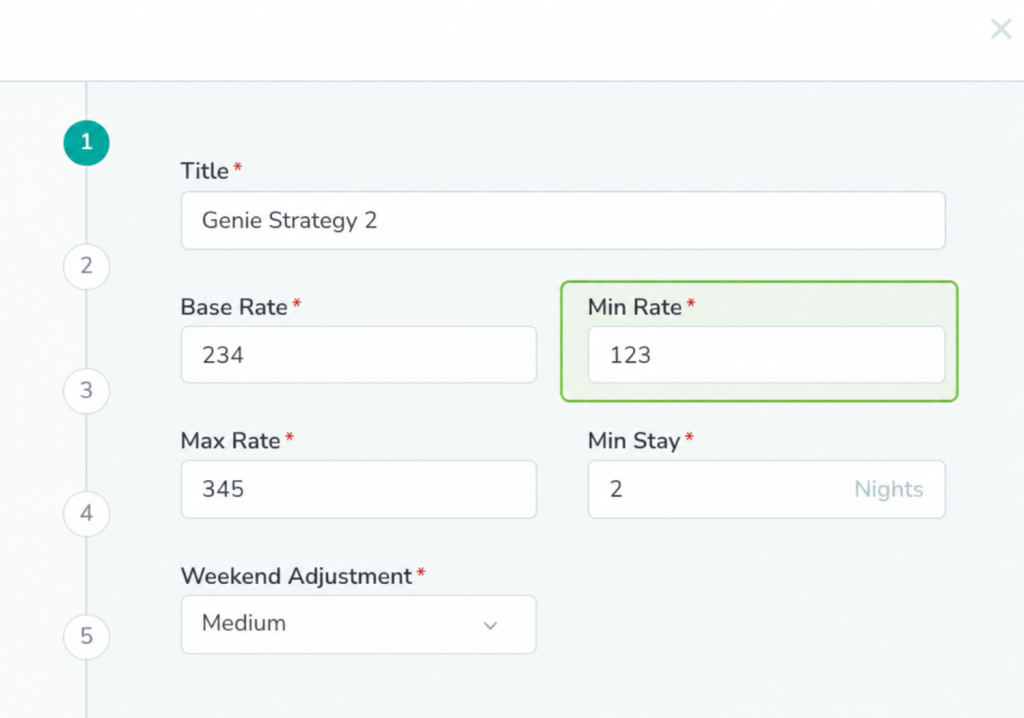
Rategenie handles this through a Genie Strategy: the host sets a Base Rate, a Min Rate, and a Max Rate, and Rategenie calculates nightly rates within those bounds using rule-based adjustments — including a gap-night rule aimed specifically at single unbooked nights between reservations. A property manager isn’t manually re-checking rates listing by listing as shoulder season sets in; the bounds and rules are set once, then applied consistently as demand shifts. For more on avoiding fixed-rate mistakes, see Tokeet’s guide to dynamic pricing for vacation rentals.
This matters because reactive discounting — dropping a rate sharply after a listing sits empty for several nights — tends to chase demand instead of meeting it. Industry experts interviewed by Rental Scale-Up on shoulder-season strategy make a similar point: prioritizing occupancy over average daily rate during the slowdown, and relaxing rigid minimum-stay rules, tends to hold more of the calendar than panic-cutting rates across the board. Treated this way, Booking.com occupancy becomes less a matter of chance and more a function of how quickly the rate rules behind a listing respond to the demand that’s actually showing up.
One Channel Out of Sync Is Enough to Lose a Booking
Rate adjustments only help Booking.com occupancy if the availability behind them is accurate everywhere a guest might be looking. A gap night that’s been priced correctly on Booking.com still won’t book if the calendar shown there doesn’t match what’s actually open.
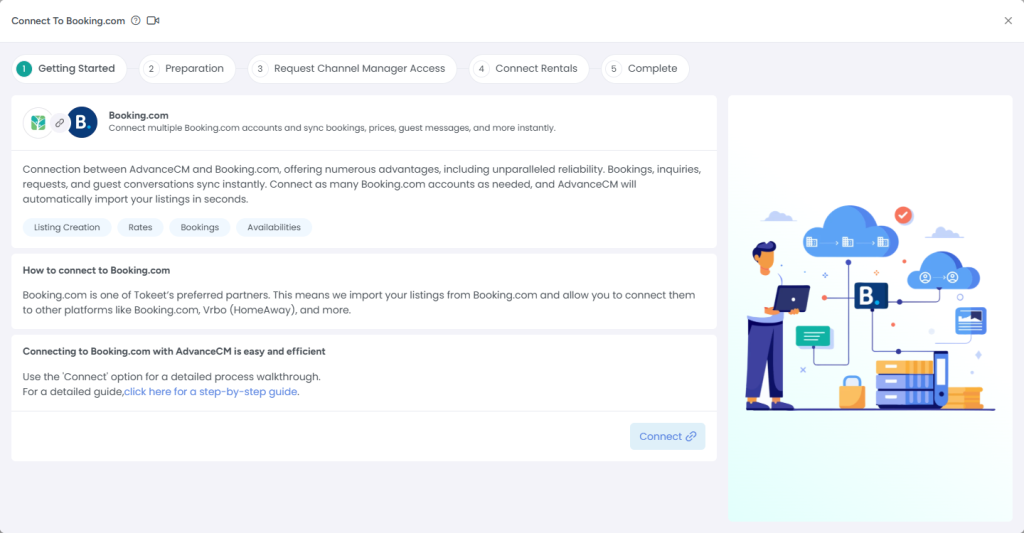
AdvanceCM’s Channel Manager keeps calendars and availability updated across connected channels — including Booking.com — at least once per day, with additional updates possible, so a booking, cancellation, or rate change made anywhere doesn’t leave stale information sitting on Booking.com or any other channel. Tokeet’s own breakdown of why a channel manager matters specifically for Booking.com rentals covers the double-booking risk in more depth. For a property manager listing across Booking.com, Airbnb, and other channels at once, that sync is what prevents a genuinely available gap night from looking booked on the one channel a shoulder-season guest happens to check.
This is also where double-booking risk tends to spike. Shoulder-season demand is less predictable — bookings arrive with shorter lead times, across a wider mix of channels. Keeping Booking.com’s calendar current alongside every other connected channel is less about a single big fix and more about removing a recurring source of missed or duplicated bookings during the exact weeks when occupancy is already under more pressure.
When a Smaller Team Can’t Keep Up, Occupancy Pays for It
Shoulder season often coincides with smaller teams — seasonal staff rotate out, and the people left are covering more properties across more channels with less daily volume to justify a full peak-season headcount. That’s precisely when manual, repetitive tasks become the bottleneck instead of demand itself, and the ones most likely to slip are the ones nobody is explicitly assigned to catch.
AdvanceCM’s Autopilot is built to reduce that manual coordination — automating repetitive operational workflows so staff spend less time on routine tasks and more time on the decisions that actually affect occupancy, like adjusting a rate floor or responding to a guest inquiry about a shorter stay. It doesn’t eliminate manual work entirely, but it removes enough repeated coordination that a smaller shoulder-season team can keep pace with the same listings across Booking.com and every other channel.
The practical effect is fewer things falling through the cracks when there’s less staff capacity to catch them — and Booking.com occupancy is usually the first place a missed gap night or an unsynced calendar shows up. Rate reviews, calendar checks, and guest follow-ups are most likely to slip once a team is stretched thinner, and each one left unattended is a small, direct hit to how full the calendar stays.
A Shoulder-Season Booking.com Occupancy Checklist
- Review rate floors and minimum-stay settings before the calendar visibly slows, not after.
- Set or confirm gap-night pricing rules so that single unbooked nights get targeted pricing automatically.
- Loosen minimum-stay settings built for peak-week bookings so that shorter shoulder-season trips can book.
- Confirm Booking.com and every other connected channel reflect the same availability and rates, especially right after any manual change is made.
- Identify which routine tasks can be automated as staffing shrinks for the season.
- Recheck this list on a set weekly or biweekly cadence through shoulder season rather than only once at the start.
FAQs
- Does Booking.com occupancy drop the same way for every property?
No — the size of the drop depends on market, property type, and how quickly rates and minimum stays are adjusted. [Needs validation for any specific market.] The pattern of demand shifting rather than disappearing is consistent; the exact timing isn’t. - Should I lower rates or loosen minimum stays first?
Minimum stays first, usually — a rate cut can’t sell a stay length the listing still refuses to offer in the first place. - Why does a minimum-stay setting cause a gap night on Booking.com?
A minimum-stay setting excludes shorter stays entirely, so a single open night between two bookings stays unsellable until that setting is loosened for the period around it. - How often does AdvanceCM sync availability with Booking.com?
At least once per day, with additional updates possible — enough to stop routine syncing from depending on someone remembering to do it, though a manual change is still worth a direct check. - Does automation replace the need to review rates manually?
No. Rate bounds and strategy rules still need to be set and reviewed by a person; automation reduces how often that person has to manually re-enter rates across every listing and channel.
Keeping the Calendar Full as Demand Shifts
Peak season ending doesn’t automatically have to mean occupancy falling off. The listings that hold their calendars together through shoulder season are usually the ones where rate rules, availability, and daily workflows adjust ahead of the slowdown instead of after it.
Start with the rate floor and minimum-stay settings, confirm Booking.com and every other channel show the same availability, and look for the manual tasks most likely to slip once the team gets smaller. For broader revenue tactics, Tokeet’s guide to increasing rental revenue is a useful next stop — but those three checks cover most of where Booking.com occupancy after peak season is actually won or lost.

Welcome to Tokeet’s Podcast — your trusted source for insights, trends, and strategies shaping the vacation rental industry. Each episode features expert interviews, data-driven analysis, and practical tips to help property managers grow their businesses, improve guest experiences, and stay ahead in a rapidly evolving market. Whether you’re new to short-term rentals or managing a large portfolio, tune in to stay informed and inspired.
Some days just don’t work for a guest arrival, whether it’s a holiday, a maintenance window, or a turnover day your team can’t cover. This episode walks through check-in and check-out restrictions, the most requested feature in AdvanceCM, now live in the Rentals module. You’ll hear how to block arrivals or departures for a date range, such as December 24 to 26, and how to allow check-ins only on the weekdays you choose. We also cover channel-specific rules, like keeping Airbnb to Friday and Saturday arrivals while direct bookings stay open through Sunday. Finally, we explain what to check before switching rules on, from existing reservations to sync time and visibility on booking sites.
Key Takeaways:
✅ Block check-ins or check-outs for any date range
✅ Limit arrivals to the weekdays you choose
✅ Set different rules for each booking channel
✅ Existing reservations stay unchanged
✅ More restrictions mean fewer guests can book, so review rules each season
Related Links:
Company: https://www.tokeet.com/Blogs: https://www.tokeet.com/blog/Blog: Check-in and Check-out Restrictions: How to Set Them in AdvanceCM 👉 https://blog.tokeet.com/check-in-and-check-out-restrictions/
This is a public episode. If you would like to discuss this with other subscribers or get access to bonus episodes, visit podcast.tokeet.com


