

Expedia guest messaging can feel like a full-time job when it only lives inside Expedia Partner Central. You log in, answer a question, jump back to your PMS, and repeat while hoping you didn’t miss anything in between.
This article shows you how to bring Expedia guest messaging into one organized workflow inside AdvanceCM so you can stay focused and reply faster.
You’ll see what the Expedia messaging integration does, how it changes your daily routine, and a few simple habits that keep every conversation under control.
Why Expedia Guest Messaging Feels So Scattered
When Expedia guest messaging only happens in Expedia Partner Central, it becomes one more inbox on top of email, Airbnb, Booking.com, and direct bookings. Each extra login or browser tab is another chance to overlook a new question or change request.
You also lose context because your PMS holds the booking details while Expedia guest messaging sits somewhere else. Even answering a quick check-in question can mean clicking around to confirm dates, rates, or notes instead of just replying.
How AdvanceCM Centralizes Expedia Guest Messaging
With the Expedia messaging integration turned on, all Expedia guest messaging flows straight into the AdvanceCM Unified Inbox. You read and reply to Expedia guests from the same screen as your other channels, instead of bouncing in and out of Partner Central.
Because the connection is fully two-way, anything you send from your inbox shows up to the guest on Expedia, and their replies land right back in your inbox. Each Expedia thread appears next to booking details, so you can see stay dates, guest info, and notes while you type and keep your whole team working from the same view.
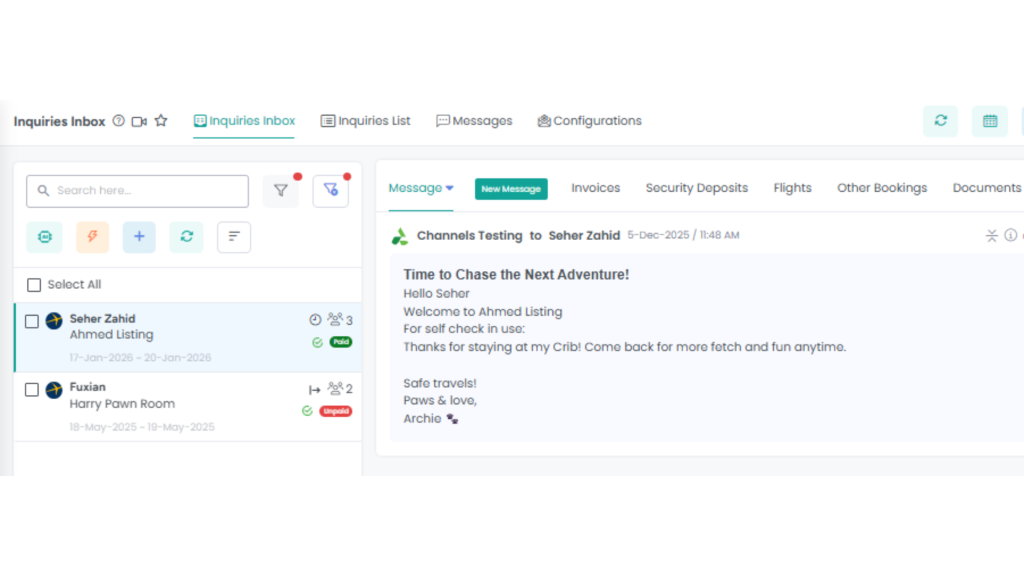
Handle Expedia guest messaging directly inside the AdvanceCM Inbox, with each guest conversation and booking details side by side.
Connecting Expedia Guest Messaging Only Takes a Few Minutes
The actual setup for Expedia guest messaging is quick and only has to be done once. You sign in to AdvanceCM, go to your channels or connections area, and link your Expedia account with messaging permissions so conversations start flowing in automatically.
Once it’s connected, send a test message from an Expedia reservation and make sure it appears in your inbox, then reply from AdvanceCM. After that, most property managers barely open Partner Central for messaging because everything they need is right in one place.
Best Practices to Stay on Top of Every Message
Fast, clear replies are one of the easiest ways to stand out in crowded short-term rental markets. Expedia Group’s partner resources emphasize that strong communication and well-managed tools help improve performance and booking outcomes for vacation rentals. Partners Expedia Group
In my experience as a property manager, three habits make a big difference with Expedia guest messaging: assign a daily “inbox owner,” use short templates for common questions, and set a simple response target like under one hour. You can pick a plan that fits your portfolio and team size on the AdvanceCM pricing page and build those habits around one shared inbox instead of juggling multiple tabs.
Conclusion
Expedia guest messaging doesn’t need to be another scattered, stressful task on top of everything else you manage. By moving those conversations into AdvanceCM, you trade platform hopping and guesswork for one clear, organized inbox your whole team can trust. That means faster replies, fewer missed questions, and a smoother guest experience across your entire portfolio.
FAQs
Q: Do I still need to log into Expedia Partner Central once messaging is connected?
A: For daily guest communication, usually not. You can send and receive Expedia guest messaging directly from your AdvanceCM Inbox and reserve Partner Central for account-level tasks.
Q: Will conversations stay in sync if my team sometimes replies from Expedia?
A: Yes, the integration keeps threads synced between Expedia and AdvanceCM. You’ll get the cleanest workflow if your team replies from one place most of the time.
Q: Can I see reservation details while replying to Expedia guest messaging?
A: Yes, key booking details appear right beside each conversation in the Inbox. That means you can answer questions without switching screens to check dates, notes, or pricing.
Q: Does the integration support automation or only manual replies?
A: You can pair Expedia guest messaging with your existing messaging rules and templates inside AdvanceCM. That lets you automate routine touchpoints and keep manual replies for special situations.
Q: How do I get started if I’m new to the platform?
A: Choose a plan that matches your portfolio on the pricing page, complete onboarding, and then connect Expedia guest messaging using the help article. Once that’s done, you can work from one unified inbox for all your channels.

Welcome to Tokeet’s Podcast — your trusted source for insights, trends, and strategies shaping the vacation rental industry. Each episode features expert interviews, data-driven analysis, and practical tips to help property managers grow their businesses, improve guest experiences, and stay ahead in a rapidly evolving market. Whether you’re new to short-term rentals or managing a large portfolio, tune in to stay informed and inspired.
Some days just don’t work for a guest arrival, whether it’s a holiday, a maintenance window, or a turnover day your team can’t cover. This episode walks through check-in and check-out restrictions, the most requested feature in AdvanceCM, now live in the Rentals module. You’ll hear how to block arrivals or departures for a date range, such as December 24 to 26, and how to allow check-ins only on the weekdays you choose. We also cover channel-specific rules, like keeping Airbnb to Friday and Saturday arrivals while direct bookings stay open through Sunday. Finally, we explain what to check before switching rules on, from existing reservations to sync time and visibility on booking sites.
Key Takeaways:
✅ Block check-ins or check-outs for any date range
✅ Limit arrivals to the weekdays you choose
✅ Set different rules for each booking channel
✅ Existing reservations stay unchanged
✅ More restrictions mean fewer guests can book, so review rules each season
Related Links:
Company: https://www.tokeet.com/Blogs: https://www.tokeet.com/blog/Blog: Check-in and Check-out Restrictions: How to Set Them in AdvanceCM 👉 https://blog.tokeet.com/check-in-and-check-out-restrictions/
This is a public episode. If you would like to discuss this with other subscribers or get access to bonus episodes, visit podcast.tokeet.com


