
Booking.com dynamic pricing can cut your nightly rate even when you never meant to discount that date. The problem is rarely one obvious setting. It is the quiet pileup of promotions, guest-targeted offers, and visibility programs that can turn a healthy rate into a thin-margin booking before you even realize what changed.
That is where most hosts get burned. They think they set the rate, but the guest sees something lower once the same Booking.com Genius program confusion shows up in day-to-day hosting. If you want control back, you need to know which pricing layers move the final rate, where your true floor sits, and which settings deserve a monthly review.
This article explains how Booking.com dynamic pricing affects the rate guests actually see, and where AdvanceCM Channel Manager and RateGenie fit into a more controlled pricing workflow.
Booking.com dynamic pricing can lower the guest-facing rate when your base price interacts with Genius, mobile discounts, country-specific offers, and date-based promotions. The fix is simple but not passive: set a real rate floor, audit stacked discounts every month, and compare live OTA pricing against the rules you actually want.
Why Booking.com’s Dynamic Pricing Drops Below Your Floor
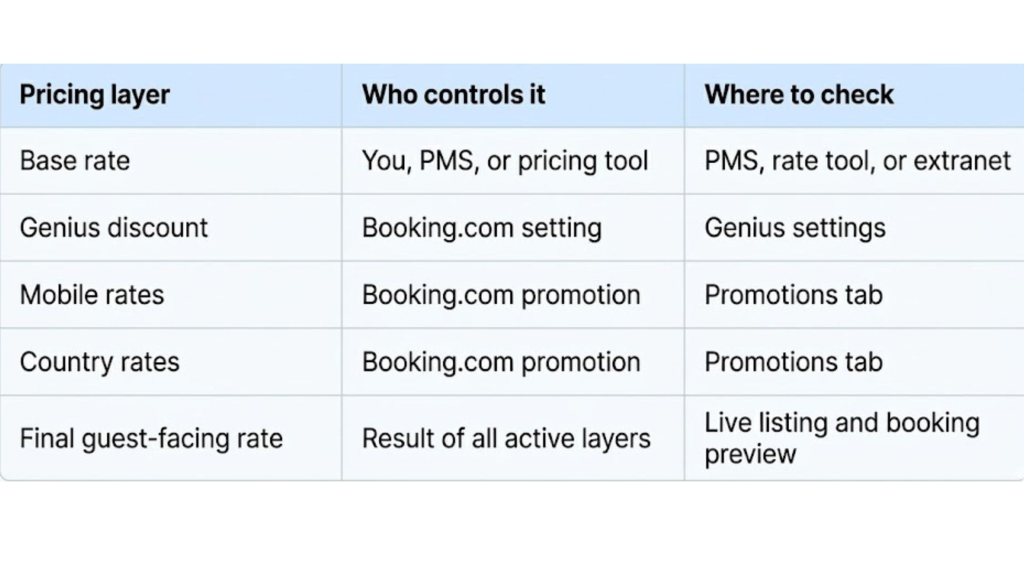
Booking.com dynamic pricing usually feels random only because hosts see the final sold rate after the booking lands. In reality, the price often moves in layers: your base rate, a targeted promotion, a loyalty discount, and the way Booking.com packages that offer for a specific audience.
Here is what that looks like in real life. You set a $200 nightly rate. A 10% Genius discount brings it to $180. Then another targeted offer pulls it lower again. By the time the reservation comes through, the guest thinks they found a great deal, and you are staring at a rate you never would have accepted on purpose.
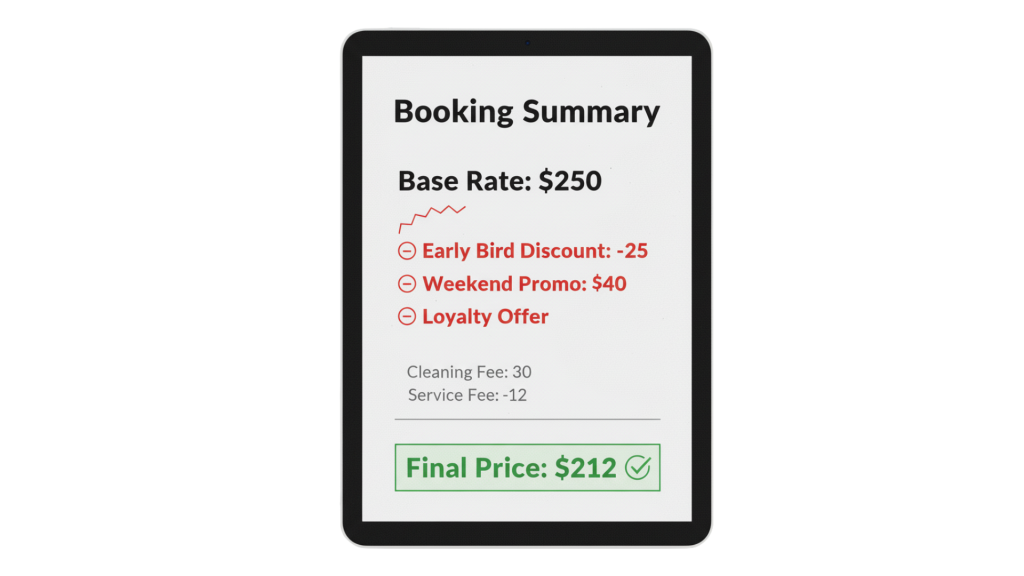
What looks like one discount is often several pricing layers working at once.
Before: You see a booking that looks too cheap, open the extranet, and start hunting through tabs to figure out what changed.
After: You know your floor first; you know which discounts are allowed to touch it, and you check exceptions before underpriced nights become a habit.
The biggest trap is thinking one setting explains everything. A base rate can look fine on your side while the country rates setup adds another discount layer for targeted markets, and the Booking.com Genius program can widen the gap even more if you leave broad eligibility in place. On top of that, when a property joins Genius, Booking.com can automatically apply the entry-level discount to the least expensive and most popular unit, which is why hosts often feel surprised by where the price moved first.
A pricing problem is really a control problem. If your team has no clean way to compare source rates, allowed discounts, and live OTA pricing, you will keep finding the issue after checkout instead of before it. A good place to see how that drift shows up operationally is this post on preventing pricing errors with a channel manager.
Here is a simple way to think about the price stack:
How to Audit Booking.com Dynamic Pricing Before the Next Booking
Booking.com’s dynamic pricing gets easier to manage when you stop asking, “Why was this booking cheap? ” and start asking, “Which layer was allowed to touch this date? ”Run this check in order every time.
- Find the source rate first.
Confirm whether your starting price came from the extranet, your PMS, or your pricing tool. If you skip this step, you can end up blaming the platform for a bad source rate you set somewhere else. - Review the Booking.com Genius program before anything else.
Check which room types, dates, and guest segments are eligible. If the Booking.com Genius program is active too broadly, your surprise discount may be working exactly as configured. - Check mobile, country, and date-based promotions one by one.
Do not lump them together. Mobile rates and other targeted deals are useful when you choose them on purpose, but they are expensive when they sit on nights you meant to protect. - Compare the live guest-facing rate to your true floor, not just your base rate.
Your floor is the lowest number you can accept after discounts, fees, cleaning, and commission pressure. If the live rate lands below that number, the setup failed even if the base price looked reasonable. - Log the exception and decide whether the date should ever be discounted again.
Hosts lose money when the same pricing mistake repeats across weekends, events, or peak weeks. Write down which rule was broken, then either tighten the promotion or block that date from future discounting.
That is the point where Booking.com’s dynamic pricing stops feeling like a black box. Once you trace each rate back to a source, a promotion, and a floor, you can fix the rule instead of arguing with the result.
Want one place to push rates out, compare channels, and catch mismatches faster? See the AdvanceCM Channel Manager.
Where the Mechanism Breaks When You Manage Rates in Too Many Places
Most margin leaks do not start with one bad discount. They start when the rate lives in one tool, the promotion lives in another, the guest message lands somewhere else, and nobody on the team can tell which number is the real source of truth.
That is where Booking.com’s dynamic pricing becomes dangerous. If RateGenie sets the target rate, but your ops team still has to bounce between extranets to confirm whether that rate survived platform discounts, the workflow is already broken. AdvanceCM is Tokeet’s latest channel manager, and it gives hosts one place to push rates across channels so pricing drift is easier to spot before a bad booking lands.

When you centralize pricing, Booking.com becomes one channel you control, not the one controlling you.
You do not need new tools to start—just fix the edge cases first.
Once the basics are clean, the workflow gets simpler. RateGenie calculates the target, your channel manager distributes it, and your team reviews outliers instead of hand-editing tabs all day. If you want the broader operational case for that setup, this article on why a channel manager matters for Booking.com rentals lays it out well.
When Booking.com’s Dynamic Pricing Helps and When It Hurts
Booking.com dynamic pricing can help when you are trying to fill soft dates, compete in crowded urban markets, or create movement during lower-demand periods. It works best when your goal is controlled visibility, not when your goal is protecting a premium rate on dates that are already likely to sell.
Booking.com’s dynamic pricing usually hurts when you treat every date the same. Peak weekends, event nights, premium homes, and short, high-demand windows need tighter guardrails, especially when the Genius program and other promotions are broad enough to keep eating margin after your base rate is set.
The Booking.com Genius program is not automatically bad. It is just expensive when you leave it on full autopilot for inventory that should be defended, not discounted.
Monthly Rules That Keep Booking.com Dynamic Pricing From Drifting
Booking.com dynamic pricing should be reviewed on a schedule, not only after a painful booking. A short monthly audit catches most problems early: confirm your floor by room type; review the Booking.com Genius program; inspect targeted promotions; and spot-check one or two future dates against the live guest-facing rate.
Keep the process boring on purpose. One checklist, one owner, one decision log. If your team already struggles with sync gaps and cross-channel mistakes, pair this with a tighter control process like the one in Prevent Double Bookings: 3 Methods That Work, because pricing chaos and inventory chaos usually travel together.
Conclusion
Booking.com does not have to run your pricing strategy. The problem is not that discounts exist. The problem is letting discounts touch dates, room types, and guest segments without a floor that protects your margin.
When you treat Booking.com’s dynamic pricing as one input instead of the final decision-maker, the whole system gets easier to manage. Set the floor, audit the Booking.com Genius program, review targeted promotions, and push your source rates from one place so every exception is obvious before it costs you money.
If you want a cleaner way to keep rate rules consistent across channels, take a look at the AdvanceCM Channel Manager.
FAQs
- Why did my room sell below my expected rate?
Most of the time, the final guest-facing price was touched by more than one rule. Your base rate may have been fine, but the Booking.com Genius program or another targeted discount pushed the sold rate below your comfort zone. - Is Booking.com dynamic pricing the same as revenue management?
No. Booking.com dynamic pricing is a platform-side pricing layer, while revenue management is your own strategy for setting floors, ceilings, seasonality, and profit targets. - Can Booking.com discounts stack on top of each other?
Yes, that is often where the problem starts. A base rate can be reduced by Genius, mobile discounts, country-specific promotions, or other offers, which is why the final rate can drift much lower than you expected. - Can I turn off every discount on Booking.com?
You can turn off many promotions or tighten who can access them, but you should not rely on memory. The safer move is to define a real floor first, then remove or limit any program that can break it. - What should I document before contacting support about a bad rate?
Save screenshots of the source rate, the live rate, the booking confirmation, and the active promotions for that date. If you can show the source number, the discount path, and the final sold price, your case is much easier to escalate.

Welcome to Tokeet’s Podcast — your trusted source for insights, trends, and strategies shaping the vacation rental industry. Each episode features expert interviews, data-driven analysis, and practical tips to help property managers grow their businesses, improve guest experiences, and stay ahead in a rapidly evolving market. Whether you’re new to short-term rentals or managing a large portfolio, tune in to stay informed and inspired.
Some days just don’t work for a guest arrival, whether it’s a holiday, a maintenance window, or a turnover day your team can’t cover. This episode walks through check-in and check-out restrictions, the most requested feature in AdvanceCM, now live in the Rentals module. You’ll hear how to block arrivals or departures for a date range, such as December 24 to 26, and how to allow check-ins only on the weekdays you choose. We also cover channel-specific rules, like keeping Airbnb to Friday and Saturday arrivals while direct bookings stay open through Sunday. Finally, we explain what to check before switching rules on, from existing reservations to sync time and visibility on booking sites.
Key Takeaways:
✅ Block check-ins or check-outs for any date range
✅ Limit arrivals to the weekdays you choose
✅ Set different rules for each booking channel
✅ Existing reservations stay unchanged
✅ More restrictions mean fewer guests can book, so review rules each season
Related Links:
Company: https://www.tokeet.com/Blogs: https://www.tokeet.com/blog/Blog: Check-in and Check-out Restrictions: How to Set Them in AdvanceCM 👉 https://blog.tokeet.com/check-in-and-check-out-restrictions/
This is a public episode. If you would like to discuss this with other subscribers or get access to bonus episodes, visit podcast.tokeet.com


