
 Vacation rental dynamic pricing breaks first during event weeks. A concert, sports weekend, school break, or citywide conference can change booking pace in hours, and static rates or late manual pricing changes usually miss the best window to respond.
This article breaks down where vacation rental dynamic pricing goes wrong, how to set better pricing rules, and what changes when property managers stop relying on seasonal grids and reactive updates.
See how Advance Intelligence AI fits into an exception-review workflow.
Vacation rental dynamic pricing means rates move when booking pace, local events, occupancy, lead time, or seasonality change. The goal is not endless price edits. The goal is to protect peak nights, fill weaker dates with clearer rules, and reduce the manual pricing misses that fixed calendars create.
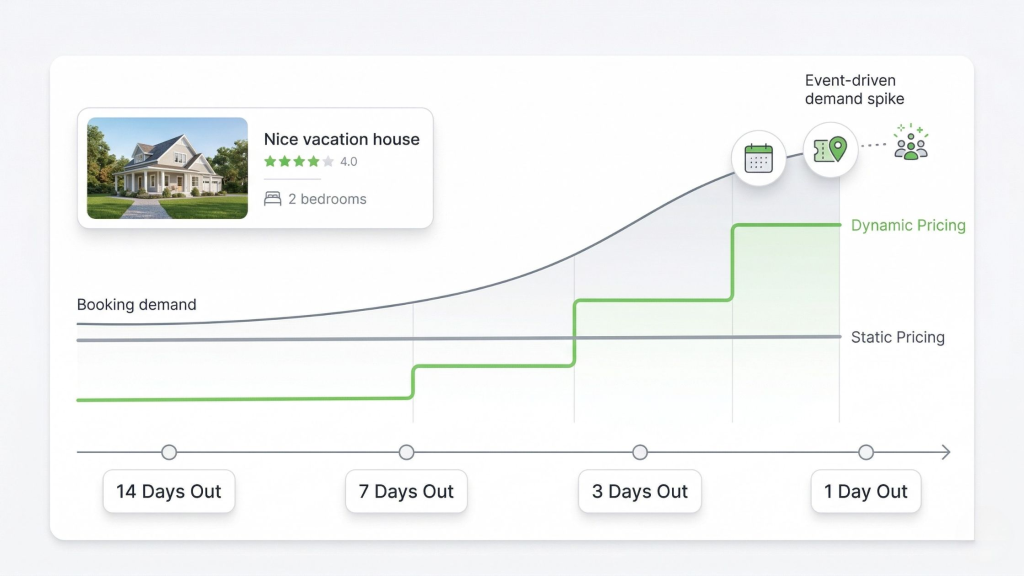
Event demand rarely moves in a straight line. Static rates stay flat while booking pressure rises.
Before: Seasonal rate sheets, one pricing pattern across unlike properties, slow event checks, and last-minute overrides after demand already moved.
After: Property-level base rates, event and lead-time triggers, cleaner exception review, and faster pricing moves when the market shifts.
What Vacation Rental Dynamic Pricing Actually Changes
Vacation rental dynamic pricing changes the job from setting a seasonal calendar to setting conditions for when rates should move. Instead of asking whether July is “high season,” managers ask what should happen when booking pace accelerates, nearby inventory tightens, or shoulder nights start lagging.
At a basic level, dynamic pricing changes prices when demand changes instead of keeping them fixed. For short-term rentals, that matters because every unsold night expires. Once the date passes, the revenue opportunity is gone.
In practice, this means a festival Saturday should not use the same pricing logic as the Tuesday before it. A large group home should not inherit the same setup as a small studio. And a property pacing ahead of normal demand should not sit at the same rate just because no one has opened the spreadsheet yet.
This is where manual pricing starts to drag. The issue is rarely judgment. It is the constant checking, comparing, and rechecking across a live calendar, which is why this guide on Airbnb occupancy rate benchmarks and smarter pricing decisions is a useful next read.
Where Vacation Rental Dynamic Pricing Breaks During Event Weeks
Vacation rental dynamic pricing usually fails when teams treat pricing like a fixed plan with occasional edits. They build a rate table by season, tweak a few holidays, and step in manually when something unusual shows up.
That sounds controlled until demand moves faster than the team does. Searches jump, nearby listings sell out, and your best nights can book before anyone adjusts the rate. The revenue loss is not mysterious. It comes from reacting after the demand window has already opened.
Another common mistake is applying one pricing pattern across unlike inventory. Premium homes, pet-friendly units, family listings, and gap-fill apartments do not respond the same way to lead time or event demand. One rule set usually creates two problems at once: strong nights get sold too cheaply, while weaker dates stay overpriced.
Then teams start watching competitors and copying what they see. That is still manual pricing. You are reacting to published prices instead of reacting to your own booking pace, stay restrictions, owner rules, and inventory gaps.
That lag gets worse on OTAs where discount layers can keep moving the guest-facing rate after you think your pricing is done. This breakdown of Booking.com dynamic pricing and surprise discount stacks shows how rate floors drift when teams only review the result after the booking lands.
How to Set Vacation Rental Dynamic Pricing Without Losing Control
Vacation rental dynamic pricing works best when the system makes exceptions easier to spot. The goal is not to remove human judgment. The goal is to stop spending it on obvious dates.
- Set a base rate by property type.
Start with a usable baseline for each property class, season, and market position. A large home, a premium condo, and a studio should not begin from the same number. - Add real demand triggers.
Use occupancy thresholds, booking pace shifts, local events, day-of-week patterns, and lead-time rules. These are the conditions that usually justify a rate move in real operations. - Separate protection dates from fill dates.
Some nights need tighter pricing discipline because demand is strong. Other nights need flexibility because the real goal is to close a gap without weakening the rest of the calendar. - Build in constraint rules early.
Owner floors, minimum stays, blackout dates, turnover limits, and channel-specific needs should sit inside the pricing logic instead of getting patched in later. - Review exceptions instead of everything.
Managers add the most value when they step into unusual demand patterns, not when they spend hours repeating the same manual pricing check across the whole portfolio.
You don’t need new tools to start—just fix the edge cases first.
If your team is still spending too much time on spreadsheets and repetitive edits, look at how Advance Intelligence AI shifts the work toward exception review.
Why Centralized Workflows Catch More Pricing Misses
Pricing mistakes rarely stay inside pricing. A missed rate change affects where a listing gets booked, how fast availability changes, what kind of guest demand shows up next, and how much operational pressure lands on the team after the reservation is confirmed.
If pricing, sync, and channel updates live in separate places, the handoff breaks fast. That is why channel manager setup can hurt bookings when the workflow is messy. Matters here.
AdvanceCM is Tokeet’s latest channel manager.
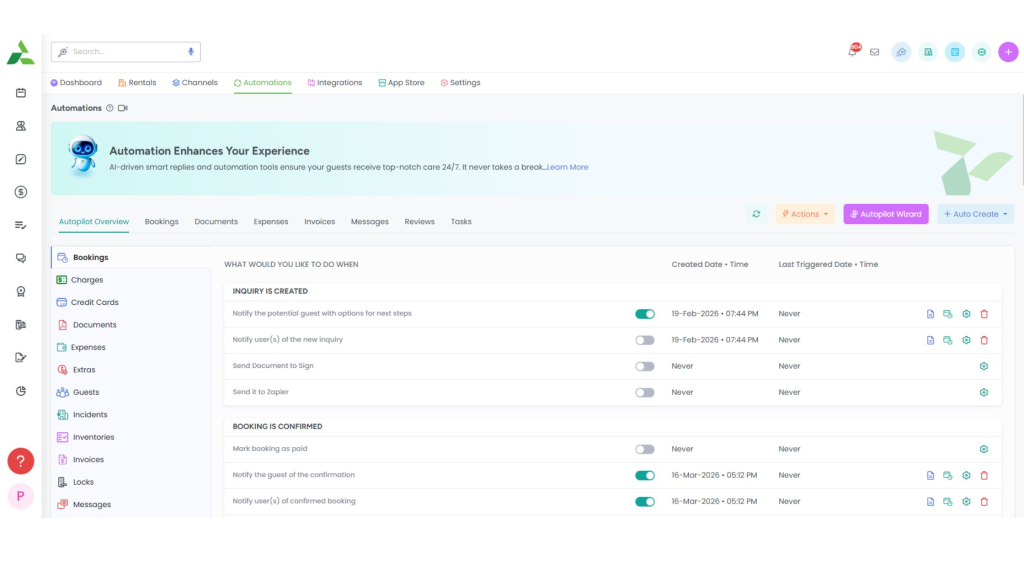
AdvanceCM keeps pricing decisions closer to availability, channel updates, and day-to-day operations.
That matters because the rate decision should sit closer to the rest of the operating workflow. A connected channel manager workflow reduces the odds of pricing, availability, and listing updates drifting apart during busy demand periods.
The same thing happens after a demand spike. More bookings usually mean more guest questions, more check-in coordination, and more room for instructions to get lost, so a shared unified inbox gives teams one place to see, assign, and track conversations when the calendar gets busy.
Good vacation rental dynamic pricing is not just a better rate. It is a cleaner operating path from demand signal to booking to guest handoff.
Pricing Clarity Still Matters After the Rate Changes
Vacation rental dynamic pricing only helps if the final price still feels clear to the guest. Higher rates during peak demand are one thing. Confusing totals or buried mandatory charges are another problem.
The FTC’s guidance on short-term lodging says businesses must include mandatory fees in the displayed total price and make that total more prominent than other pricing information. You can review the FTC’s short-term lodging fee guidance for the exact standard.
That matters because better rates do not fix trust problems by themselves. If the guest feels surprised by the final price, revenue control and price clarity are pulling in opposite directions.
Peak-demand weeks do not create pricing problems. They expose them. Vacation rental dynamic pricing works when managers set better rules, review real exceptions, and spend less time putting out avoidable manual pricing fires.
See how the broader workflow fits together on the AdvanceCM.
FAQs
- What is vacation rental dynamic pricing?
It is a pricing approach that changes rates when demand signals change, such as booking pace, lead time, occupancy, or local events. It replaces fixed seasonal pricing with rule-based adjustments that respond to what is happening now. - How often should rates change?
Rates should change when the signal changes, not because someone picked a random review day. Event weeks, short booking windows, and sudden occupancy compression usually need closer attention than stable low-demand periods. - Does every property need the same pricing rules?
No, because different property types and stay patterns respond differently to demand. A larger home, a premium unit, and a gap-fill listing should not all use the same rate logic. - Can managers still override automated pricing?
Yes, and that is where managers usually add the most value. A good system reduces routine manual pricing work, but it does not remove human judgment from unusual dates or owner-specific constraints. - What is the difference between dynamic pricing and a seasonal calendar?
A seasonal calendar sets broad prices in advance and often stays static until someone edits it. Dynamic pricing starts with a base rate, then changes that rate when booking conditions or demand timing move.

Welcome to Tokeet’s Podcast — your trusted source for insights, trends, and strategies shaping the vacation rental industry. Each episode features expert interviews, data-driven analysis, and practical tips to help property managers grow their businesses, improve guest experiences, and stay ahead in a rapidly evolving market. Whether you’re new to short-term rentals or managing a large portfolio, tune in to stay informed and inspired.
Some days just don’t work for a guest arrival, whether it’s a holiday, a maintenance window, or a turnover day your team can’t cover. This episode walks through check-in and check-out restrictions, the most requested feature in AdvanceCM, now live in the Rentals module. You’ll hear how to block arrivals or departures for a date range, such as December 24 to 26, and how to allow check-ins only on the weekdays you choose. We also cover channel-specific rules, like keeping Airbnb to Friday and Saturday arrivals while direct bookings stay open through Sunday. Finally, we explain what to check before switching rules on, from existing reservations to sync time and visibility on booking sites.
Key Takeaways:
✅ Block check-ins or check-outs for any date range
✅ Limit arrivals to the weekdays you choose
✅ Set different rules for each booking channel
✅ Existing reservations stay unchanged
✅ More restrictions mean fewer guests can book, so review rules each season
Related Links:
Company: https://www.tokeet.com/Blogs: https://www.tokeet.com/blog/Blog: Check-in and Check-out Restrictions: How to Set Them in AdvanceCM 👉 https://blog.tokeet.com/check-in-and-check-out-restrictions/
This is a public episode. If you would like to discuss this with other subscribers or get access to bonus episodes, visit podcast.tokeet.com


