

AdvanceCM Now Integrates with Zapier
Automation helps streamline property management tasks, reducing manual effort and improving efficiency. AdvanceCM’s integration with Zapier allows users to connect their property management workflows with thousands of apps, enabling smooth data transfer and automation.
This guide will walk you through how to set up the integration and create Zaps using AdvanceCM’s Autopilot feature.
What is the AdvanceCM + Zapier Integration?
Zapier is a no-code automation platform that connects different apps and automates workflows. The AdvanceCM integration with Zapier enables users to trigger actions in other applications whenever specific events occur within AdvanceCM.
With this integration, users can automate tasks such as:
- Sending booking data to spreadsheets or CRM systems
- Logging expenses and invoices in accounting tools
- Notifying team members when a new task or message is created
AdvanceCM uses its Autopilot feature to send data to Zapier when certain conditions are met, allowing for greater flexibility in automation.
How to Connect AdvanceCM with Zapier
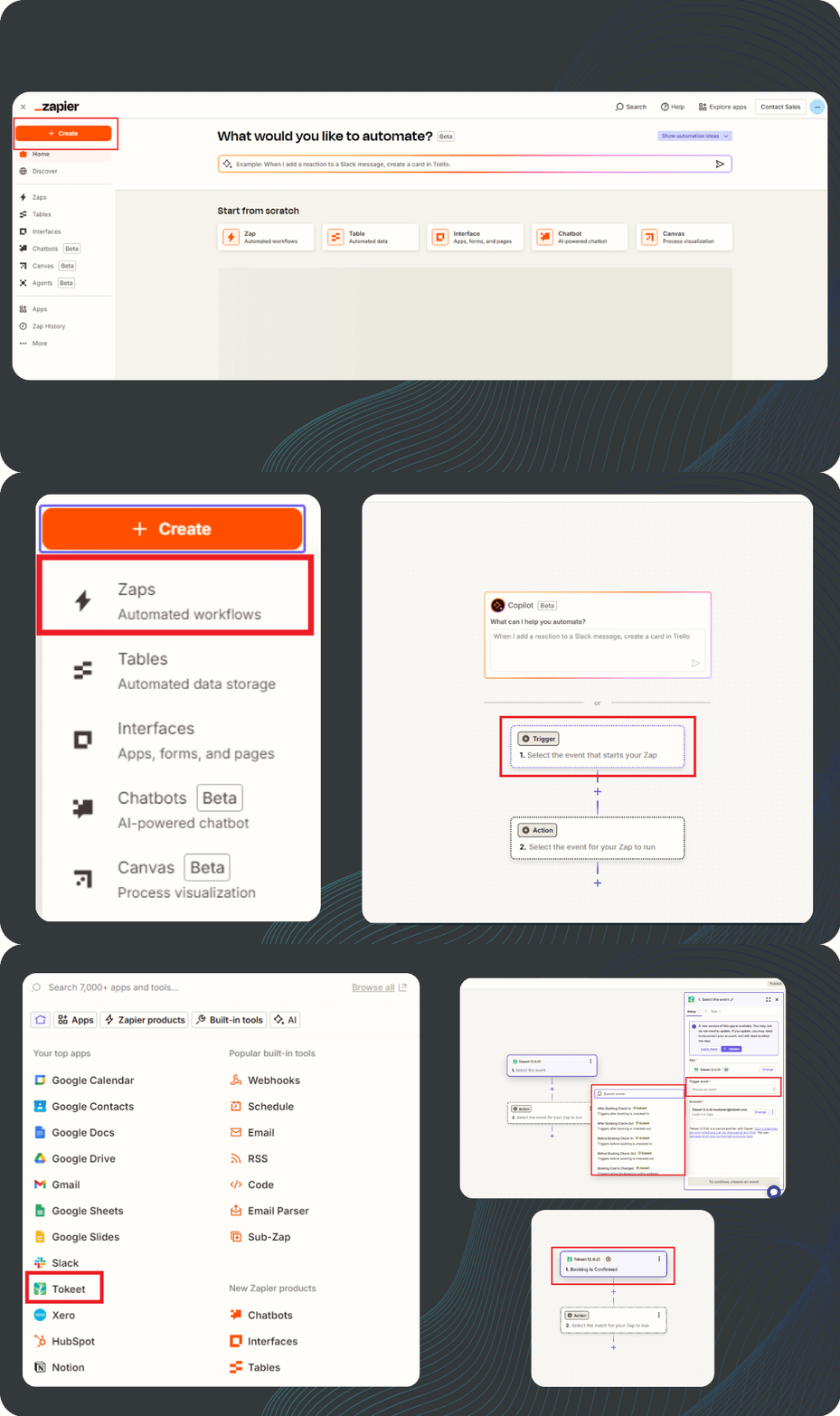 To integrate AdvanceCM with Zapier, follow these steps:
- Sign up for Zapier (if you don’t already have an account) and log in.
- Generate an API key from your AdvanceCM account and connect it to Zapier.
- Create a new Zap in Zapier and select AdvanceCM as the trigger app.
- Choose a trigger event – This is the action in AdvanceCM that will start the automation (e.g., a new booking is created).
- Select an action app – This is the external application where you want the data to be sent (e.g., Google Sheets, Slack, an email service, etc.).
- Test and activate the Zap – Run a test to ensure the setup works correctly, then enable the automation.
For a detailed walkthrough, visit the AdvanceCM Zapier integration guide.
How to Create a Zap Using AdvanceCM Autopilot
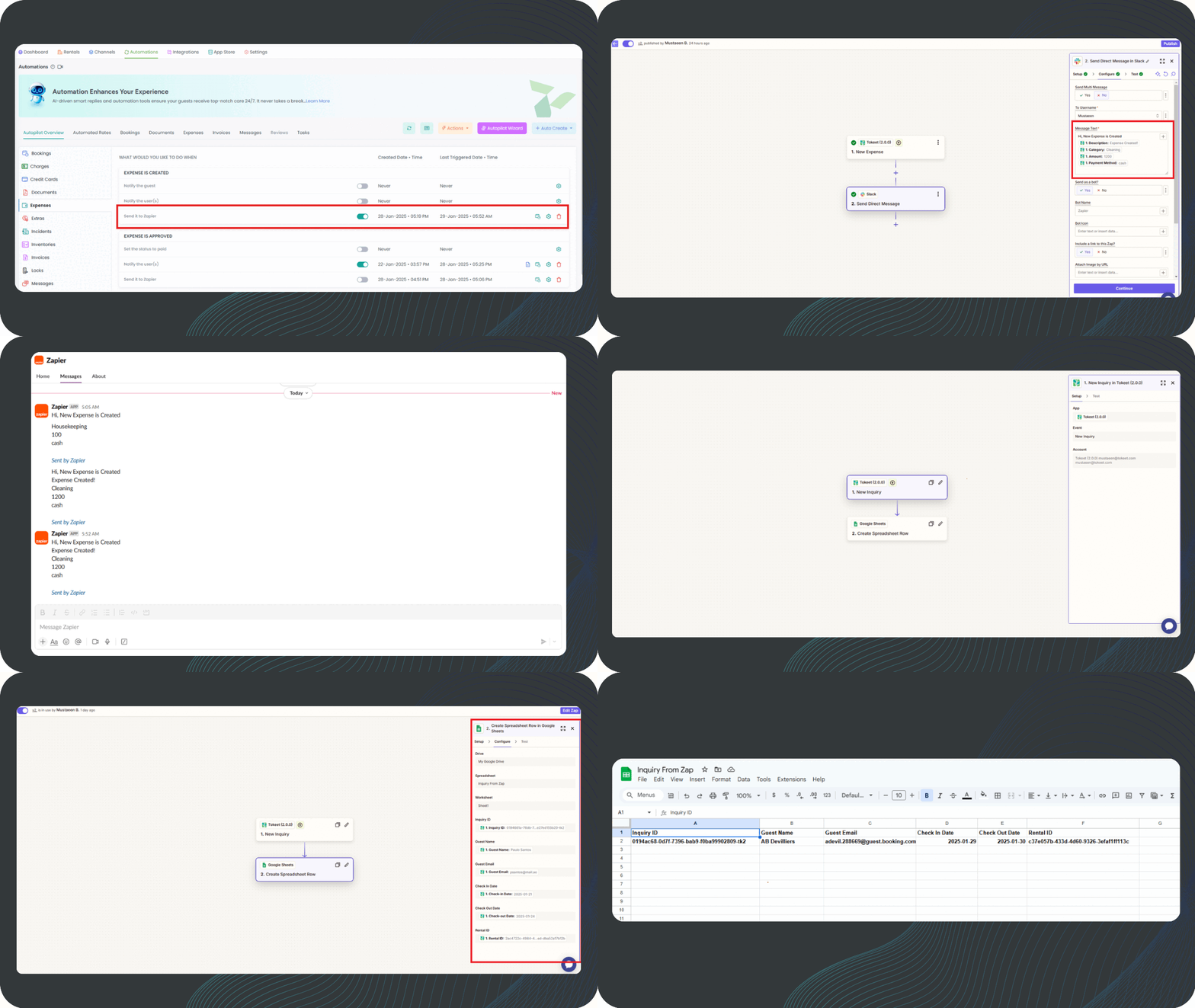 AdvanceCM’s Autopilot feature provides additional automation options by allowing users to trigger Zaps based on specific conditions.
The “Send it to Zapier” option is currently available for these modules:
- Bookings
- Expenses
- Invoices
- Messages
- Tasks
To set up a Zap using the Autopilot feature:
- Go to Autopilot in AdvanceCM and select the event trigger.
- Enable the “Send it to Zapier” option for the relevant module.
- Create a new Zap in Zapier, choosing AdvanceCM as the trigger app.
- Define the action – Select the external app where data should be sent (e.g., updating a spreadsheet or sending a notification).
- Test & Activate – Verify the setup by running a test, then turn on the automation.
For more details, refer to this help article.
Conclusion
The AdvanceCM + Zapier integration simplifies property management by reducing manual work and automating key processes. Whether you’re tracking bookings, managing expenses, or organizing tasks, this integration helps you save time and improve workflow efficiency.
Follow the linked help articles to set up your automations and start streamlining your operations today.

Welcome to Tokeet’s Podcast — your trusted source for insights, trends, and strategies shaping the vacation rental industry. Each episode features expert interviews, data-driven analysis, and practical tips to help property managers grow their businesses, improve guest experiences, and stay ahead in a rapidly evolving market. Whether you’re new to short-term rentals or managing a large portfolio, tune in to stay informed and inspired.
Some days just don’t work for a guest arrival, whether it’s a holiday, a maintenance window, or a turnover day your team can’t cover. This episode walks through check-in and check-out restrictions, the most requested feature in AdvanceCM, now live in the Rentals module. You’ll hear how to block arrivals or departures for a date range, such as December 24 to 26, and how to allow check-ins only on the weekdays you choose. We also cover channel-specific rules, like keeping Airbnb to Friday and Saturday arrivals while direct bookings stay open through Sunday. Finally, we explain what to check before switching rules on, from existing reservations to sync time and visibility on booking sites.
Key Takeaways:
✅ Block check-ins or check-outs for any date range
✅ Limit arrivals to the weekdays you choose
✅ Set different rules for each booking channel
✅ Existing reservations stay unchanged
✅ More restrictions mean fewer guests can book, so review rules each season
Related Links:
Company: https://www.tokeet.com/Blogs: https://www.tokeet.com/blog/Blog: Check-in and Check-out Restrictions: How to Set Them in AdvanceCM 👉 https://blog.tokeet.com/check-in-and-check-out-restrictions/
This is a public episode. If you would like to discuss this with other subscribers or get access to bonus episodes, visit podcast.tokeet.com


